Showing posts with label maven. Show all posts

Tuesday, April 24, 2018

Gradle / Maven Dependency Conflict Issue - 定位冲突的根本思路

Resolving Maven Dependency Conflict Problem In Intellij, 这次从根本上记录下排查dependency conflict的debug思路。
一般出现冲突的现象是,在服务器端提示如下错误信息:
2018-04-25 11:09:08,624 [ERROR] [http-nio-8591-exec-8] (org.apache.catalina.core.ContainerBase.[Tomcat].[localhost].[/].[dispatcherServlet]) - Servlet.service() for servlet [dispatcherServlet] in context with path [] threw exception [Handler dispatch failed; nested exception is java.lang.NoSuchMethodError: com.google.protobuf.AbstractMessageLite$Builder.addAll(Ljava/lang/Iterable;Ljava/util/List;)V] with root cause
java.lang.NoSuchMethodError: com.google.protobuf.AbstractMessageLite$Builder.addAll(Ljava/lang/Iterable;Ljava/util/List;)V
...
本example中可见是com.google.protobuf.AbstractMessageLite$Builder.addAll方法无法找到。既然zip包里存在冲突,则先解压缩,navigate到所有jar包所在目录,执行如下command:
ll | awk '{print $9}' | xargs -I %%% sh -c 'echo "current_jar="%%%; jar tf %%%' > dep.txt
目的是将所有jar包的所有class信息都print出来。然后找到AbstractMessageLite类所在的jar包(如果存在冲突,一定有至少两个jar包存在此类)。由此找到hive-exec-2.3.2.jar和protobuf-java-3.5.1.jar两个包都存在此类。Apply javap -classpath <jar_file> 'com.google.protobuf.AbstractMessageLite$Builder' to both jar files respectively, 可以得到如下部分log:
~/Downloads/kuaishou-lineage-webapp-1.0-SNAPSHOT/lib $ javap -classpath protobuf-java-3.5.1.jar 'com.google.protobuf.AbstractMessageLite$Builder'
Compiled from "AbstractMessageLite.java"
public abstract class com.google.protobuf.AbstractMessageLite$Builder<MessageType extends com.google.protobuf.AbstractMessageLite<MessageType, BuilderType>, BuilderType extends com.google.protobuf.AbstractMessageLite$Builder<MessageType, BuilderType>> implements com.google.protobuf.MessageLite$Builder {
...
protected static <T> void addAll(java.lang.Iterable<T>, java.util.Collection<? super T>);
protected static <T> void addAll(java.lang.Iterable<T>, java.util.List<? super T>);
...
}
~/Downloads/kuaishou-lineage-webapp-1.0-SNAPSHOT/lib $ javap -classpath hive-exec-2.3.2.jar 'com.google.protobuf.AbstractMessageLite$Builder'
Compiled from "AbstractMessageLite.java"
public abstract class com.google.protobuf.AbstractMessageLite$Builder<BuilderType extends com.google.protobuf.AbstractMessageLite$Builder> implements com.google.protobuf.MessageLite$Builder {
...
protected static <T> void addAll(java.lang.Iterable<T>, java.util.Collection<? super T>);
...
}
可见hive-exec-2.3.2.jar中少了一种addAll接口。只需在maven/gradle中将对应的dependency排除即可, Khalas.

Monday, April 2, 2018

third-party classpath issue in Intellij

Scenario:

There are two maven projects, A and B respectively, and B has dependency in pom.xml from A. After adding new class in project A and have completed `mvn clean install`, it could still not be found from project B.

Solution:

This is due to a bug at the maven plugin in Intellij, which could be forcibly refreshed via right-clicking on the project in B -> Maven -> Reimport.


Thursday, August 3, 2017

Resolving Maven Dependency Conflict Problem In Intellij

After deploying Spring Boot application, there's error in log complaining:
2017-04-06 10:46:14.890 ERROR 1 --- [nio-8080-exec-1] o.a.c.c.C.[.[.[/].[dispatcherServlet]    : Servlet.service() for servlet dispatcherServlet threw exception

java.lang.NoSuchMethodError: com.fasterxml.jackson.core.JsonGenerator.writeStartObject(Ljava/lang/Object;)V
        at com.fasterxml.jackson.databind.ser.std.MapSerializer.serialize(MapSerializer.java:515) ~[jackson-databind-2.8.5.jar!/:2.8.5]
This is 99% likely causing from maven dependency conflict in most scenarios.
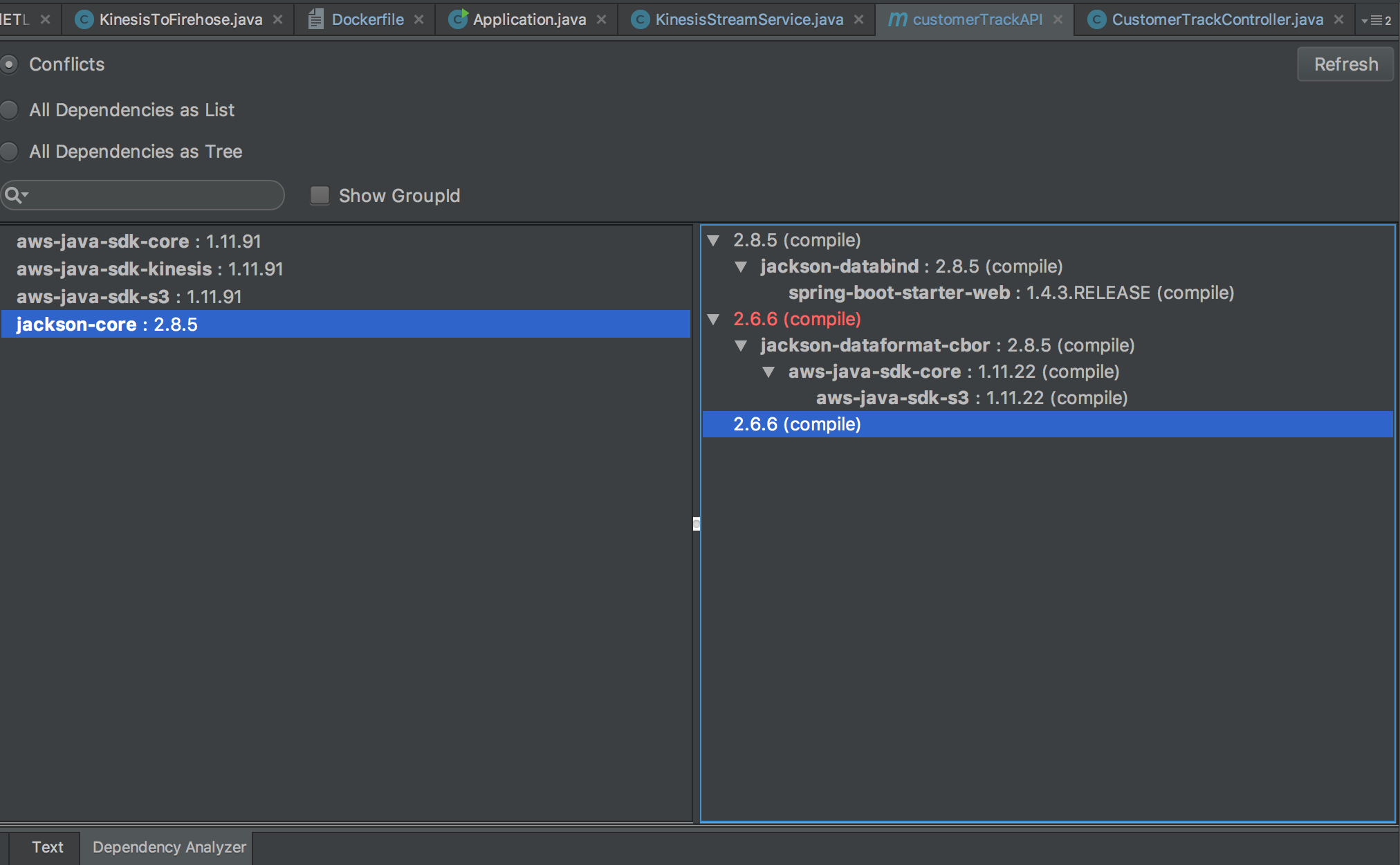
The way to solve it is always checking dependency conflict before deploying. In Intellij Idea, there's a plugin callMaven Helper, after installing, open the pom.xml file and you could find adependency analyzertab downside.
As we can see, there's two version of jackson-core packages. After going to github to check the method there, we find that 2.8.5 has methodwriteStartObject(Object forValue)whereas 2.6.6 only haswriteStartObject(). From the error above, we must exclude 2.6.6 for sure, which could be done easily independency analyzer, just right-click on the version you intend to exclude and select.

After deploying in docker from Elastic Beanstalk again, the error is still there, whereas if I run the jar file locally, there's no error. This is more interesting. I print thejackson-coredependency that is being used at runtime via the following java command:
System.out.println("FLAG123="+com.fasterxml.jackson.core.JsonGenerator.class.getProtectionDomain().getCodeSource().getLocation());
In this way, I could safely conclude that no error should be complained in docker deployment provided that both runtimejackson-coreis the same. And actually, my local version uses one of the other module's jar file as dependency. After excluding it from my pom.xml, all works fine again.

Friday, April 17, 2015

Install Maven Repository Upon Nexus

Recently, a centralized maven repository is required. Thus I'm embarking on installing a company-scoped Maven Repository these days, and it turns out to be quite easy :] Here's the main procedures.

Environment

CentOS 6.4
nexus 2.11.2-06
JDK 1.7.0_11


Procedure

Firstly, we have to install JDK. This is too piece-of-cake to elaborate here (you could google out bunch of tutorials).

After installing JDK, we could download the latest version of Nexus (NEXUS OSS TGZ) from its website. untar it and copy it to '/home/workspace' directory.

vim '$NEXUS_HOME/conf/nexus.properties' and change 'nexus-work' variable to the path where your repository files will all be resided in. This path should be created manually before Nexus is launched. Meanwhile, you could change the default 'application-host' and 'application-port' to whatever you prefer.

Then, we could simple use `$NEXUS_HOME/bin/nexus start/stop` to manipulate Nexus service.

When Nexus starting, we could access via URL 'http://10.100.7.162:8081/nexus/' (In my case, it is an inner ip of our company). The default admin user is "admin" and password is "admin123".

As for the URL, we should always append the ending '/', otherwise it would fail to resolve the webpage.

Now, we could upload our own maven project, which will act as a dependency in other projects, to Nexus. In pom.xml, add the following code:
<pluginRepositories>
    <pluginRepository>
        <id>nexus</id>
        <name>nexus</name>
        <url>http://10.100.7.162:8081/nexus/content/groups/public/</url>
        <releases><enabled>true</enabled></releases>
        <snapshots><enabled>true</enabled></snapshots>
    </pluginRepository>
</pluginRepositories>


<distributionManagement>
    <repository>
        <id>nexus-releases</id>
        <name>Nexus Releases Repository</name>
        <url>http://10.100.7.162:8081/nexus/content/repositories/releases/</url>
    </repository>
    <snapshotRepository>
        <id>nexus-snapshots</id>
        <name>Nexus SnapShots Repository</name>
        <url>http://10.100.7.162:8081/nexus/content/repositories/snapshots/</url>
    </snapshotRepository>
</distributionManagement>

Then, we should `vim ~/.m2/settings.xml` and add the following code for the purpose of authentication:
<servers>
  <server>
    <id>nexus-releases</id>
    <username>admin</username>
    <password>admin123</password>
  </server>
  <server>
    <id>nexus-snapshots</id>
    <username>admin</username>
    <password>admin123</password>
  </server>
</servers>


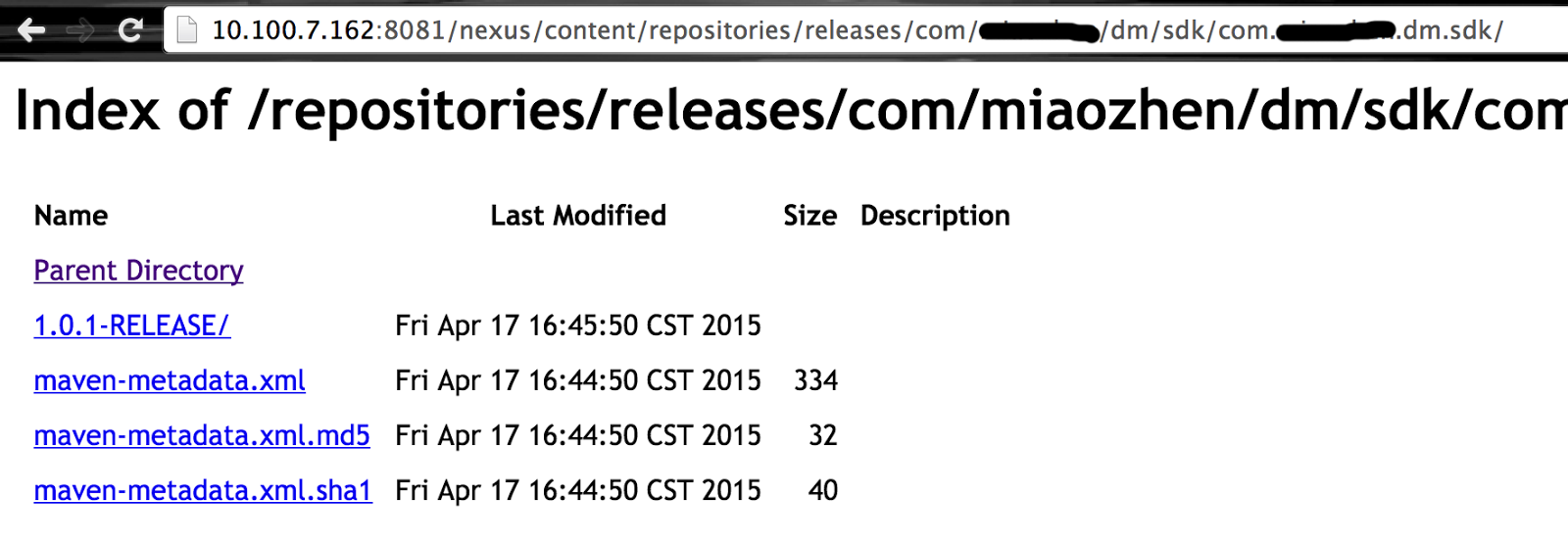
Finally, we `cd` to the project's root directory, execute `maven clean deploy`. When finished, we should see our project's jar file and auxiliary configuration files is uploaded to our Nexus server.


It's time to harvest and check on our private maven repository. Open a project which depends on the project we just uploaded to Nexus, open its pom.xml and add the following code to it:
<repositories>
    <repository>
        <id>nexus</id>
        <name>nexus</name>
        <url>http://10.100.7.162:8081/nexus/content/groups/public/</url>
        <releases>
            <enabled>true</enabled>
        </releases>
        <snapshots>
            <enabled>true</enabled>
        </snapshots>
    </repository>
</repositories>

<dependencies>
    <dependency>
        <groupId>com.XXX.dm.sdk</groupId>
        <artifactId>com.XXX.dm.sdk</artifactId>
        <version>1.0.1-RELEASE</version>
    </dependency>
</dependencies>

<pluginRepositories>
    <pluginRepository>
        <id>nexus</id>
        <name>nexus</name>
        <url>http://10.100.7.162:8081/nexus/content/groups/public/</url>
        <releases>
            <enabled>true</enabled>
        </releases>
        <snapshots>
            <enabled>true</enabled>
        </snapshots>
    </pluginRepository>
</pluginRepositories>


We could see that our private dependency is referenced correctly :]


Enhancement

#---1---# Beautify URL For Nexus Service
If we intend to resolve our content webpage to 'http://10.100.7.162/content/', without port specification as well as '/nexus/' heading part. we should set our '$NEXUS_HOME/conf/nexus.properties' like this:
# Jetty section
application-port=80
application-host=0.0.0.0
nexus-webapp=${bundleBasedir}/nexus
nexus-webapp-context-path=

# Nexus section
nexus-work=/home/data/nexus_repo
runtime=${bundleBasedir}/nexus/WEB-INF

In order to specify port to 80, we need to operate on Nexus as root user; And according to this post, put null in parameter 'nexus-webapp-context-path' would just do the trick removing the '/nexus/' heading.

#---2---# Increase Memory Of Nexus Service
We should increase the memory allocating to Nexus. This is well-explained in its official document.

epilogue

After running Nexus the first time, we should make some configurations before taking full advantage of it.

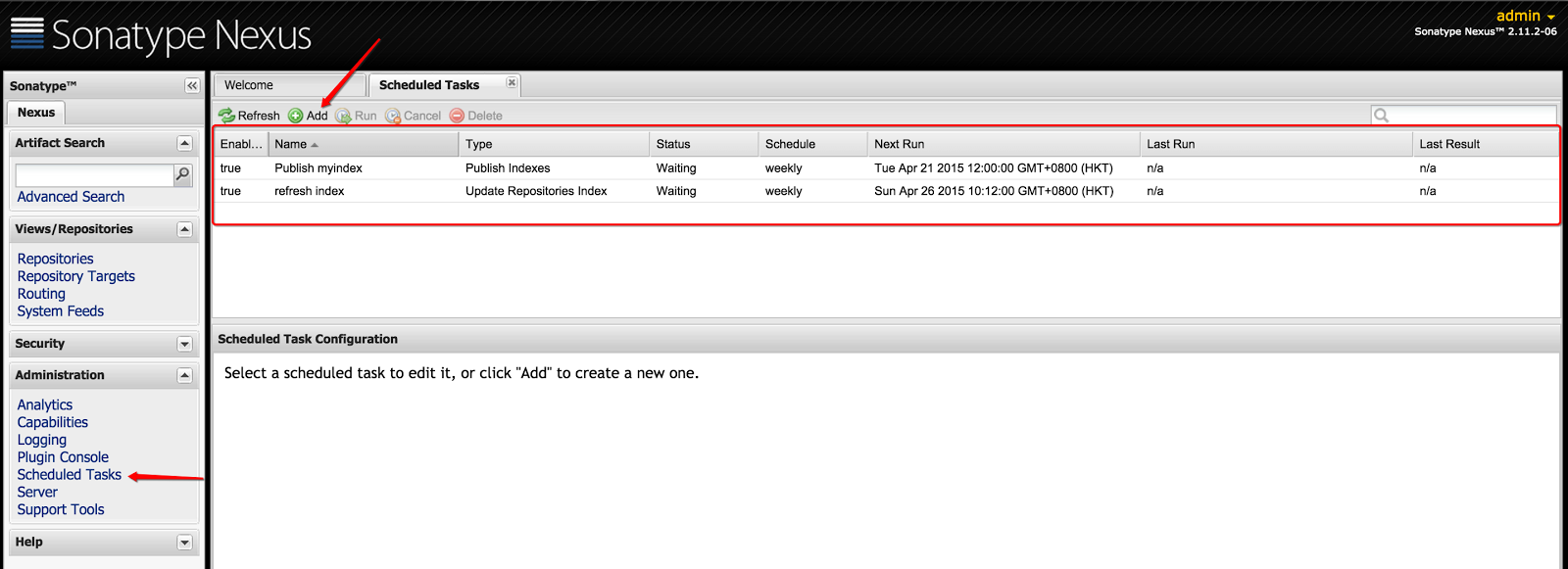
#---1---# Adding Scheduled Tasks
The first thing to do is to add two scheduled tasks, namely, updating repositories index and publish indexes, as depicted below. The function of these scheduled tasks is described here, mainly to update proxy repositories information:


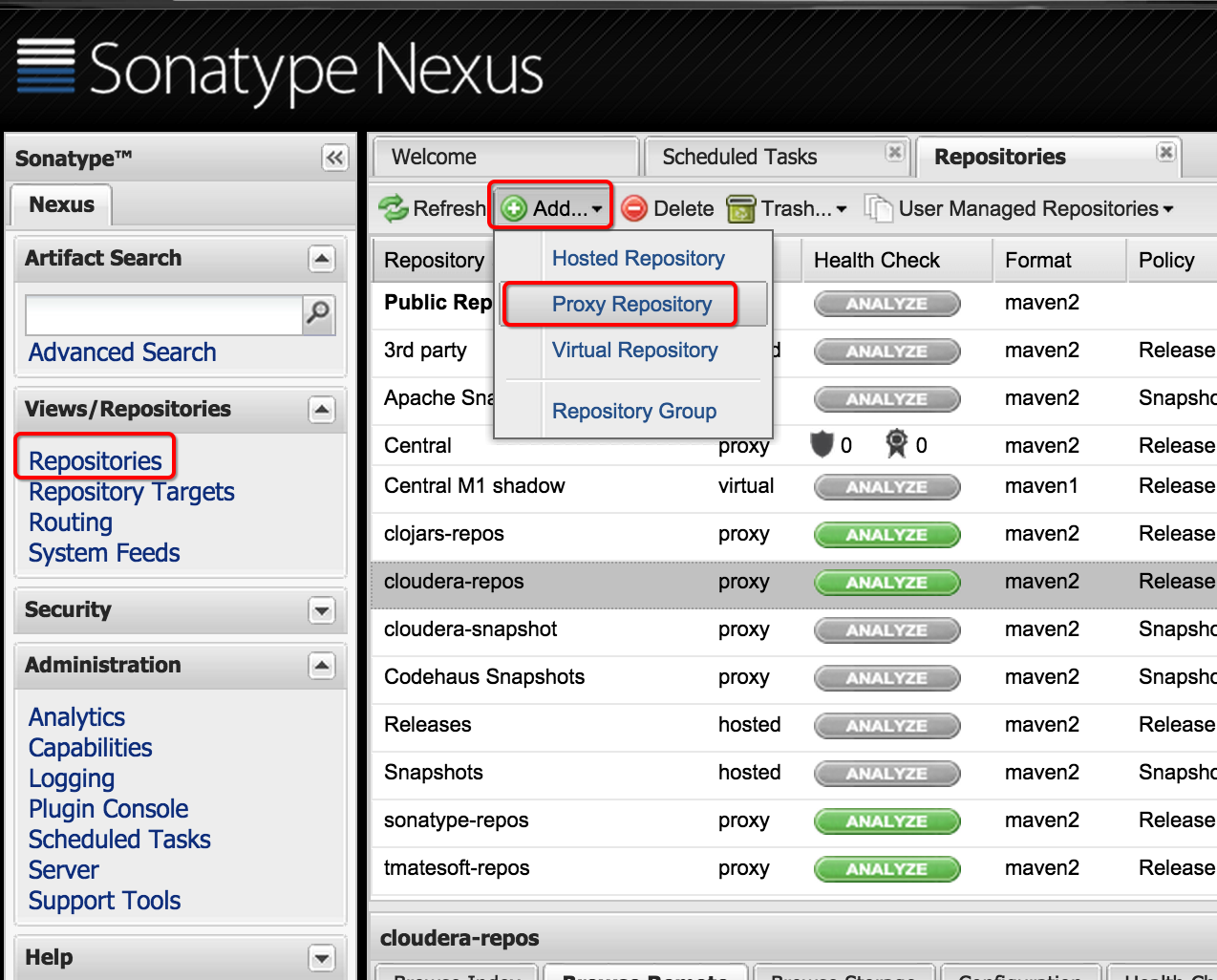
#---2---# Configuring Proxy Repositories
There are some commonly-used remote repositories which should be configured into our maven repository.

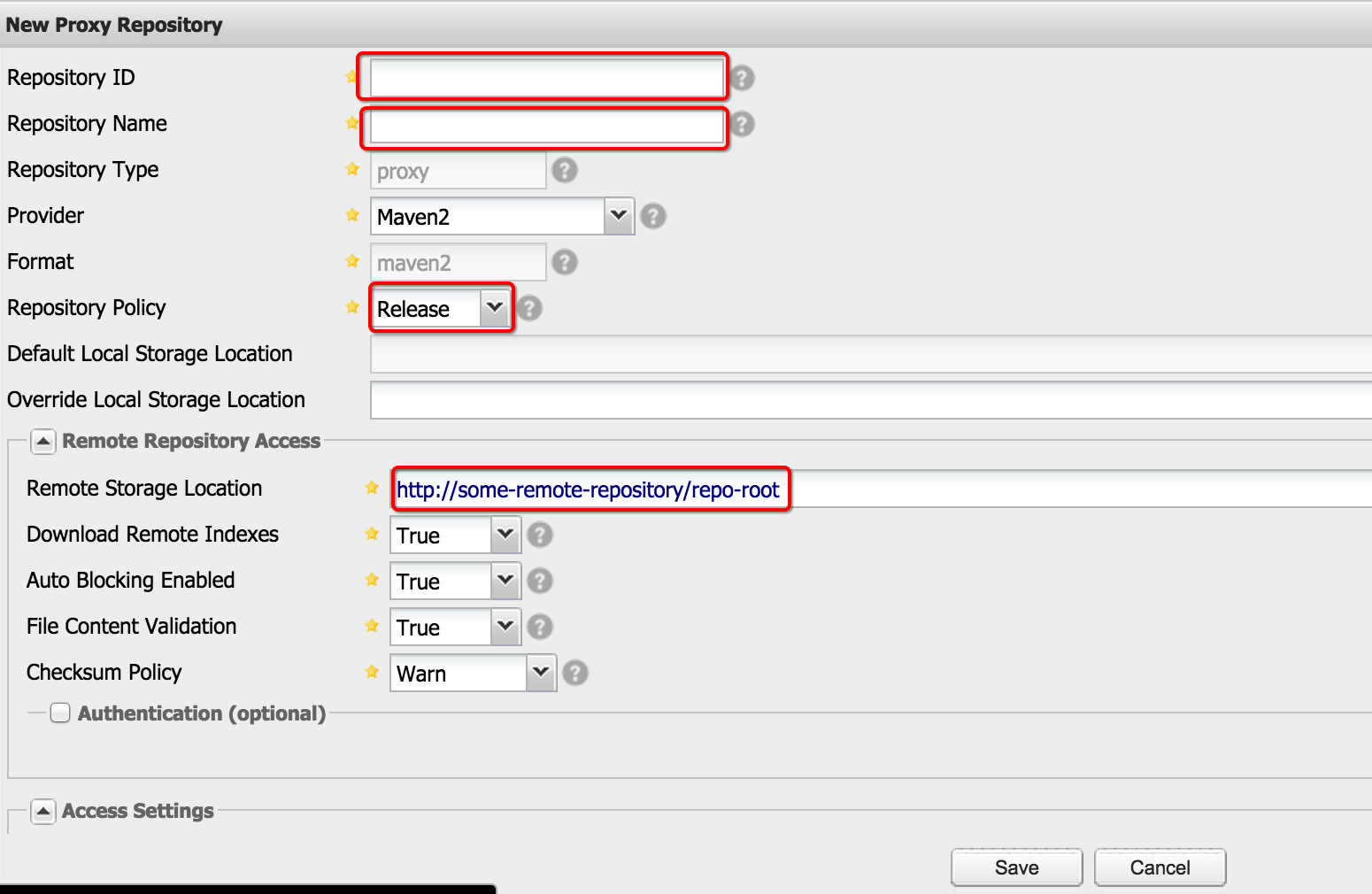
Firstly, we should add the proxy repository into our Repositories Module.


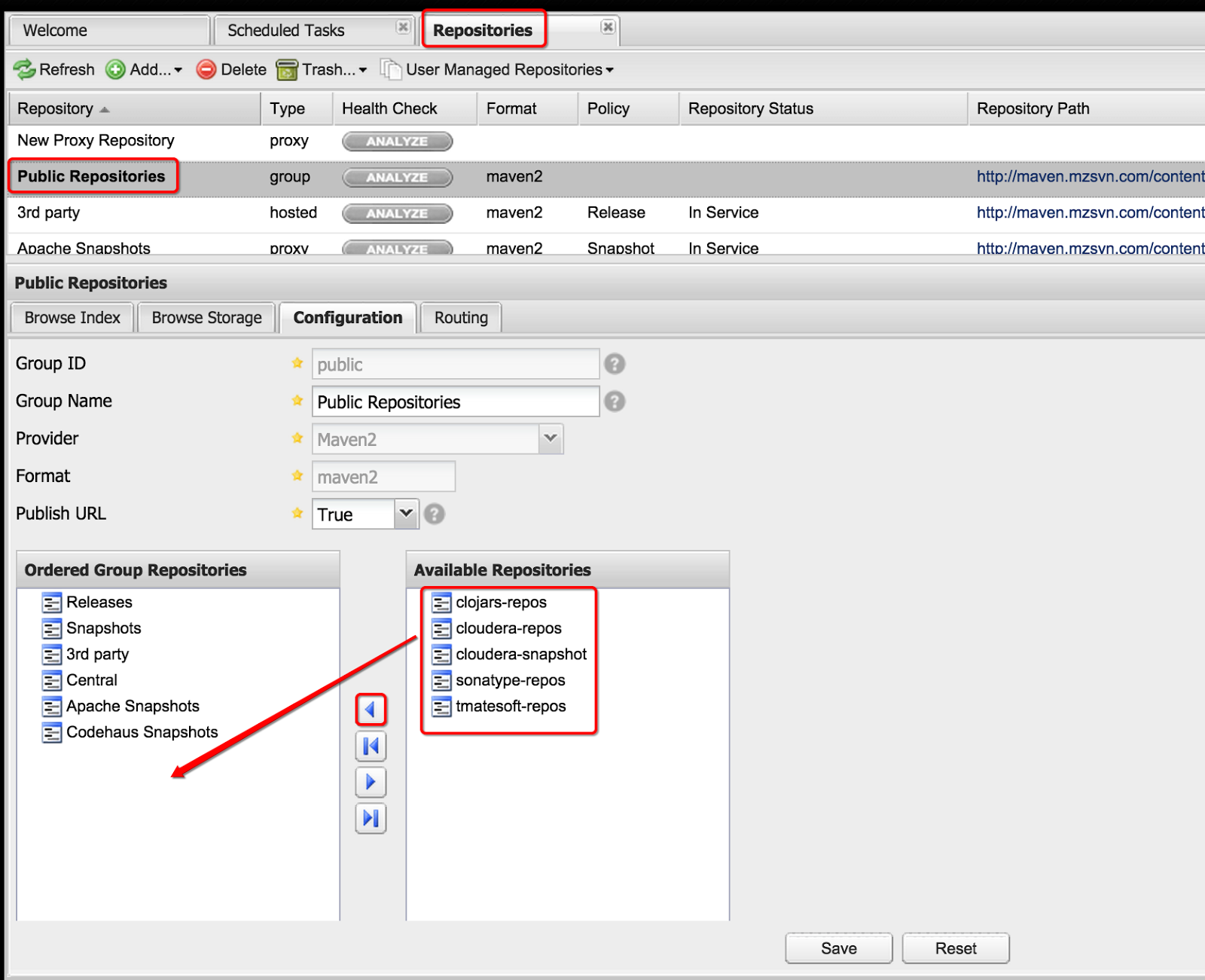
Next, append them into Public Repositories:


In this way, we could refer to almost all the common dependencies from our maven repository.


Reference:
1. Return code is: 401, ReasonPhrase:Unauthorized
2. Maven学习笔记(二、nexus仓库)
3. Maven学习笔记(三、maven配置nexus)
4. Linux 搭建Nexus


Wednesday, December 10, 2014

Way To Deploy Your Own Maven Dependency On Github

Recently, there's a need to share my own maven dependency with friends. Here's what I did in order to make github as a private maven repository.

Insert the following configuration in pom.xml which is nested in the project that you are ready to share via maven.
<build>
    <plugins>
        <plugin>
            <artifactId>maven-deploy-plugin</artifactId>
            <version>2.8.1</version>
            <configuration>
                <altDeploymentRepository>internal.repo::default::file://${project.build.directory}/mvn-repo</altDeploymentRepository>
            </configuration>
        </plugin>
    </plugins>
</build>

Execute `mvn clean deploy`, then you can find "target/mvn-repo" directory from the root of your project.

Create a github repository, execute the following command to push the project to github:
git init
git add .
git commit -m "update"
git remote add origin https://github.com/[github_repository]
git push -u origin master

Eventually, add configuration in pom.xml, whose project is going to refer to that maven dependency, as below.
<repositories>
    <repository>
        <id>miaozhen-dm-sdk-repo</id>
        <url>https://github.com/judking4/com.miaozhen.dm.sdk/tree/master/target/mvn-repo</url>
    </repository>
</repositories>
...
<dependencies>
    <dependency>
        <groupId>com.myproject.dm.sdk</groupId>
        <artifactId>com.myproject.dm.sdk</artifactId>
        <version>0.0.1-SNAPSHOT</version>
    </dependency>
</dependencies>

In which, groupId, artifactId as well as version can all be found in either the mvn-repo directory, or the pom.xml of the maven dependency project.


© 2014-2017 jason4zhu.blogspot.com All Rights Reserved 
If transfering, please annotate the origin: Jason4Zhu

Saturday, November 1, 2014

The way to download javadocs and sources in maven automatically

Only one step is needed to achieve this.
vim ~/.m2/settings.xml:
<profiles>
    <profile>
        <id>downloadSources</id>
        <properties>
            <downloadSources>true</downloadSources>
            <downloadJavadocs>true</downloadJavadocs>
        </properties>
    </profile>
</profiles>

<activeProfiles>
    <activeProfile>downloadSources</activeProfile>
</activeProfiles>

In such way, we don't have to specifying '-DdownloadSources=true -DdownloadJavadocs=true' every time we issuing a maven command from command line or in Eclipse.

© 2014-2017 jason4zhu.blogspot.com All Rights Reserved 
If transfering, please annotate the origin: Jason4Zhu