Showing posts with label Spark. Show all posts

Monday, May 7, 2018

Spark执行卡住或过慢时从YARN监控页排查思路


  • 在YARN-Stages tab,检查卡住/很慢的stage对应的executor数量,如果executor数量很少,同时对应后面的shuffle read size或者records数量很大(图1),则很可能是因为没有开启spark.dynamicAllocation.enabled。开启配置如下: 

spark.dynamicAllocation.enabled true
spark.dynamicAllocation.initialExecutors 1
spark.dynamicAllocation.minExecutors 1
spark.dynamicAllocation.maxExecutors 300
spark.shuffle.service.enabled true
  • 如果某个很慢或者卡住的stage对应的task数量为200(图2),则应该注意是spark.sql.shuffle.partitions导致的,此param默认200,可以设置为2011等大值即可。同理,如果出现tasks数量为12,则应该是由于spark.default.parallelism参数。

  • 观察“Executor页面,如果Task Time(GC Time)背景飘红,说明gc时间过长。可以通过启动时添加set spark.executor.extraJavaOptions=-verbose:gc -XX:+PrintGCDetails -XX:+PrintGCTimeStamps -XX:+PrintGC打印gc日志,从executor列表后面的stdout里查看。从优化角度讲,spark推荐使用G1GC。如果G1GC依旧出现上述问题,则可能当前在一个executor里并发的task数过多(task本身是一个算子(lambda),所以可能使当前的< 输入->输出 >后数据膨胀)。比如executor.memory为12G,executor.cores为4,则一共有4个task并行,每个task平均3g内存。如果减少cores数量,则可以变相提高每个task可使用的内存量。对于当前的case,从gc日志看出,heap space已经动态expand到12G,说明task的确需要消耗很多内存,所以只好调小cores数量从而降低gc time。

  • 在YARN-Jobs tab,可以看到所有stage列表,每项后面有Shuffle Read和Shuffle Write. 前者表示从上一个stage读取的shuffle数据数量,后者表示写出到下一个stage的shuffle数据数量。从这里可以可以粗略估计下当前stage所需的tasks数量。


  • REFERENCE: 

    spark读取hive-site.xml无法识别里面spark相关参数问题

    过如下语句启动spark-sql时,如果有spark相关参数在hive-site.xml中,并不会被load到spark environment里。spark只会从hive-site.xml中读取hive相关的参数(例如metastore信息等)。
    /home/hadoop/software/spark/bin/spark-sql \
    --master yarn \
    --deploy-mode client \
    --queue queue_1 \
    --conf spark.rpc.message.maxSize=2047 \
    --conf spark.yarn.dist.files="/path/to/hive-site.xml"
    同理,即使将spark.yarn.dist.files行的配置换成了--files /path/to/hive-site.xml或者--properties-file /path/to/hive-site.xml也没有用(--properties-file的解释为"Path to a file from which to load extra properties. If not specified, this will look for conf/spark-defaults.conf.", 读取的文件内容不应该为xml格式)。
    如果需要配置spark相关的信息,需要在SPARK_HOME/conf/spark-defaults.conf中配置。

    Monday, April 16, 2018

    HiveOnSpark系列:spark jobs partition数量调优问题


    HiveOnSpark上跑Spark application时,发现部分stage对应的task数量很少,导致full-gc严重。例如下图中的stage只有17个tasks在跑。即使设置了spark.sql.shuffle.partitions=1201和spark.default.parallelism=1202也没有用,依旧是17个。

    通过trace spark源码发现mapred.reduce.tasks参数虽然已经deprecated,但会优先spark.sql.shuffle.partitions设置到环境变量中。(spark-2.0:SetCommand:44)


    同时,根据同事给的hadoop参数优化项里hive.exec.reducers.bytes.per.reducer,把两者按如下配置后,4个stage启动的tasks数量分别从82/33/17/526变为了82/1201/1201/1201,大大增加了partition数量并as expected. 由此可见,HiveOnSpark时,Spark的execution plan应该还是走了Hive的逻辑,所以部分hadoop相关的参数会主导spark的执行计划的生成逻辑和结果


    set hive.exec.reducers.bytes.per.reducer=67108864;
    set mapred.reduce.tasks=1201;


    P.S. 
    Hive version: 0.23 
    Spark version: 2.0.3

    REFERENCE:
    • https://cwiki.apache.org/confluence/display/Hive/Configuration+Properties#ConfigurationProperties-hive.exec.reducers.bytes.per.reducer

    Hive Hook遇到的坑儿和解决思路

    问题要从Hive Execution PreHook说起。有个需求是根据SQL中用到的table/partition总大小来判断用MR还是Spark。但在执行的时候,虽然确定prehook中已经将hive.execution.engine设置为spark,但执行的时候还是使用了默认的mr。
    在hive源代码里全局搜hive.exec.pre.hooks, 可以找到入口在HiveConf的enum类中:
    PREEXECHOOKS("hive.exec.pre.hooks", "",
        "Comma-separated list of pre-execution hooks to be invoked for each statement. \n" +
        "A pre-execution hook is specified as the name of a Java class which implements the \n" +
        "org.apache.hadoop.hive.ql.hooks.ExecuteWithHookContext interface."),
    Driver类里搜索“PREEXECHOOKS”,可以发现调用的方法在Driver.execute(). 在此处抛出stacktrace(手动throw exception然后catch打印stacktrace即可)应该能获得类似如下的信息(测试时是在Optimizer打印的stacktrace):
    2018-04-12T19:55:21,535 INFO [1df5090e-6c7f-4751-8979-d4fd3ef5024e HiveServer2-Handler-Pool: Thread-92] optimize
    r.Optimizer: [FLAG_15_1] stack trace java.lang.RuntimeException: t
    at org.apache.hadoop.hive.ql.optimizer.Optimizer.initialize(Optimizer.java:66)
    at org.apache.hadoop.hive.ql.parse.SemanticAnalyzer.analyzeInternal(SemanticAnalyzer.java:11246)
    at org.apache.hadoop.hive.ql.parse.CalcitePlanner.analyzeInternal(CalcitePlanner.java:286)
    at org.apache.hadoop.hive.ql.parse.BaseSemanticAnalyzer.analyze(BaseSemanticAnalyzer.java:259)
    at org.apache.hadoop.hive.ql.Driver.compile(Driver.java:814)
    at org.apache.hadoop.hive.ql.Driver.compileInternal(Driver.java:1286)
    at org.apache.hadoop.hive.ql.Driver.compileAndRespond(Driver.java:1265)
    at org.apache.hive.service.cli.operation.SQLOperation.prepare(SQLOperation.java:204)
    at org.apache.hive.service.cli.operation.SQLOperation.runInternal(SQLOperation.java:290)
    at org.apache.hive.service.cli.operation.Operation.run(Operation.java:320)
    at org.apache.hive.service.cli.session.HiveSessionImpl.executeStatementAsyncntInternal(HiveSessionImpl.java:530)
    at org.apache.hive.service.cli.session.HiveSessionImpl.executeStatementAsync(HiveSessionImpl.java:517)
    移步到Driver.compile:814, 找到关于semantic analyzer相关逻辑:
          BaseSemanticAnalyzer sem = SemanticAnalyzerFactory.get(queryState, tree);
          List<HiveSemanticAnalyzerHook> saHooks =
              getHooks(HiveConf.ConfVars.SEMANTIC_ANALYZER_HOOK,
                  HiveSemanticAnalyzerHook.class);
    
          // Flush the metastore cache.  This assures that we don't pick up objects from a previous
          // query running in this same thread.  This has to be done after we get our semantic
          // analyzer (this is when the connection to the metastore is made) but before we analyze,
          // because at that point we need access to the objects.
          Hive.get().getMSC().flushCache();
    
          // Do semantic analysis and plan generation
          if (saHooks != null && !saHooks.isEmpty()) {
            HiveSemanticAnalyzerHookContext hookCtx = new HiveSemanticAnalyzerHookContextImpl();
            hookCtx.setConf(conf);
            hookCtx.setUserName(userName);
            hookCtx.setIpAddress(SessionState.get().getUserIpAddress());
            hookCtx.setCommand(command);
            hookCtx.setHiveOperation(queryState.getHiveOperation());
            hookCtx.setQueryState(queryState);
            hookCtx.setContext(ctx);
            for (HiveSemanticAnalyzerHook hook : saHooks) {
              tree = hook.preAnalyze(hookCtx, tree);
            }
            sem.analyze(tree, ctx);
            hookCtx.update(sem);
            for (HiveSemanticAnalyzerHook hook : saHooks) {
              hook.postAnalyze(hookCtx, sem.getAllRootTasks());
            }
          } else {
            sem.analyze(tree, ctx);
          }
    此时可以判断得出的是,在execution.prehook阶段,本身任务是mr还是spark早已确定,通过set conf肯定是无法实现的。那么此过程需要在semantic_analyzer.prehook阶段完成。但由于在sementic analyze步骤之前没有语法解析,所以没有input table/partition信息。这是解决的思路之一是,ch同构hive源码,将initial sem.analyze(tree, ctx)所需的两个参数传给semantic_analyzer.prehook,在里面先执行analyze()方法拿到input信息,从hive metastore拿到对应大小后再set conf从而决定使用mr还是spark

    Sunday, April 15, 2018

    Spark Parameter Tuning Cases Due to FullGC and Data Skew

    The default Spark setting is as follows:

    > spark.executor.memory 8g
    > spark.executor.cores 4
    > spark.dynamicAllocation.enabled true
    > spark.dynamicAllocation.initialExecutors 1
    > spark.dynamicAllocation.maxExecutors 200
    > spark.dynamicAllocation.minExecutors 1

    when running SQL as below, it shows that GC time occupies virtually as much as the running time, which, apparently, is due to a general memory issue. Overall, it took 26min to finish.

    SELECT a, b, c, d, e,
        avg(f/g) AS x1,
        percentile(cast(f/g AS bigint), array(0.5, 0.95)) AS x2
    FROM (
        SELECT a, b, c, d, e,
            h, sum(i) AS f, sum(1) AS g
        FROM tbl_name
        WHERE p_date = '20180303'
        GROUP BY a, b, c, d, e,
            h
    ) AS TZ
    GROUP BY a, b, c, d, e WITH CUBE
    SORT BY a, b DESC, c, d, e;


    after updating the following parameters, execution time reduces to 16min and GC time becomes much less dominant.

    > set spark.executor.extraJavaOptions=-XX:+UseG1GC;
    > set spark.yarn.executor.memoryOverhead=8g;
    > set spark.executor.memory=24g;

    Yet the following issue is data skew. there's stragglers running for a long time whereas the others have already finished quickly.

     This is because of the default value for both `spark.sql.shuffle.partitions` and `spark.default.parallelism`, a small setting value and large amount of data is more likely to lead to data skew and stragglers issue. After updating as follows, execution time goes down to 705s in total.

    > set spark.sql.shuffle.partitions=2467;
    > set spark.default.parallelism=127;


    REFERENCE:
    1. https://stackoverflow.com/questions/45704156/what-is-the-difference-between-spark-sql-shuffle-partitions-and-spark-default-pa
    2. https://www.jianshu.com/p/06b67a3c61a9
    3. https://databricks.com/blog/2015/05/28/tuning-java-garbage-collection-for-spark-applications.html
    4. https://www.ibm.com/support/knowledgecenter/en/SS3H8V_1.1.0/com.ibm.izoda.v1r1.azka100/topics/azkic_t_configmemcpu.htm
    5. http://spark.apache.org/docs/latest/tuning.html#garbage-collection-tuning
    6. http://www.iteye.com/news/31303


    Wednesday, November 29, 2017

    Hive table based on AWS S3 Suffers from S3 Eventual Consistency Issue

    After generating hive table based on AWS S3, there's sometime that it will suffer from eventual consistency problem from S3, with the following error complains when trying to alter current table rename to another one or select from this table:

    org.apache.hadoop.hive.ql.metadata.HiveException: Unable to alter table. Alter Table operation for db_name.tbl_name failed to move data due to: 'com.amazon.ws.emr.hadoop.fs.shaded.com.amazonaws.services.s3.model.AmazonS3Exception: Not Found (Service: Amazon S3; Status Code: 404; Error Code: 404 Not Found; Request ID: 1BAD9D1409E5AE00), S3 Extended Request ID: tPOcJz0iymDMQLq2Ucgzbxc2BG8A7xWARyg+E1cf27HLoTE/LwFiNKz/DcVzumtFytZo3ircOWI=' See hive log file for details.;], stacktrace=[org.apache.spark.sql.AnalysisException: org.apache.hadoop.hive.ql.metadata.HiveException: Unable to alter table. Alter Table operation for db_name.tbl_name failed to move data due to: 'com.amazon.ws.emr.hadoop.fs.shaded.com.amazonaws.services.s3.model.AmazonS3Exception: Not Found (Service: Amazon S3; Status Code: 404; Error Code: 404 Not Found; Request ID: 1BAD9D1409E5AE00), S3 Extended Request ID: tPOcJz0iymxxxxxxxcgzbxc2BG8A7xWARyg+E1cf27HLoTE/LwFiNKz/DcVzumtFytZo3ircOWI=' See hive log file for details.;
    at org.apache.spark.sql.hive.HiveExternalCatalog.withClient(HiveExternalCatalog.scala:98)
    at org.apache.spark.sql.hive.HiveExternalCatalog.renameTable(HiveExternalCatalog.scala:460)
    at org.apache.spark.sql.catalyst.catalog.SessionCatalog.renameTable(SessionCatalog.scala:495)
    at org.apache.spark.sql.execution.command.AlterTableRenameCommand.run(tables.scala:159)
    at org.apache.spark.sql.execution.command.ExecutedCommandExec.sideEffectResult$lzycompute(commands.scala:58)

    After some testing, there's a way to mitigate this phenomenon remarkably by constraining the partition number when persisting to the table.

    Occasionally, I explicitly set spark.sql.shuffle.partitions=2000, which by default is 200, in order to solve imbalance of partition key issue. After this setting, it appears that more tables will suffer from this s3 eventual consistency issue from then on. Empirically, it could be caused by having too much small files (2000, in current case) writing to S3 simultaneously which will cause it more likely to suffering from long-time eventual consistency problem. so I try to coalesce DataFrame before writing to table as below and this time, it seems all good now.

    val targetDf = session.sql(sql).coalesce(25)
    targetDf
      .write.mode(SaveMode.Overwrite)
      .partitionBy(partitionKey)
      .saveAsTable(tableFullName)
    

    Tuesday, October 10, 2017

    Spark/Hive 'Unable to alter table' Issue Complaining 404 Not Found On AWS S3

    There's a ETL which will create bunch of tables per day, for each of them, take tbl_a as an example, the procedure will be as following:

    1. drop table if exists tbl_a_tmp
    2. create table tbl_a_tmp
    3. alter table tbl_a_tmp rename to tbl_a

    But sometimes (randomly), it would fail on alter table complaining errors:

    Error while processing statement: FAILED: Execution Error, return code 1 from org.apache.hadoop.hive.ql.exec.DDLTask. Unable to alter table. Alter Table operation for db.tbl_a_tmp failed to move data due to: 'com.amazon.ws.emr.hadoop.fs.shaded.com.amazonaws.services.s3.model.AmazonS3Exception: Not Found (Service: Amazon S3; Status Code: 404; Error Code: 404 Not Found; Request ID: 8070D6C52909BDF2), S3 Extended Request ID: hpOCEw8ET6juVKjUTk3...nDCD9pEFN7scyQ8vPWFh3v5QM4=' See hive log file for details.

    Then I tried to use another way of coding to alter the table name via create table tbl_a stored as parquet as select * from tbl_a_tmp, then a more concrete error is printed: "java.io.FileNotFoundException: File s3://bucket_name/db/tbl_a_tmp/_temporary/0/_temporary does not exist."

    I checked and there's a _temporary 'folder' existing in AWS S3, which is empty. I deleted it and rerun alter table again and everything works fine now. I think there's possible a bug on Spark/Hive code which will leave _temporary file undeleted after the job is done.

    Thursday, August 3, 2017

    Spark Concept, Relationship And Tuning

    1. Concept And Relationship

    1.1 Static Structure
    • RDD
      • resilient distributed dataset
      • a fault-tolerant collection of elements that can be operated on in parallel. (Same structure in each RDD and could change it after applying RDD operations)
      • two ways to initial RDD
        • parallelizing an existing collection in your driver program
        • referencing a dataset in an external storage system (HDFS, or any data source offering a Hadoop InputFormat)
    • partition
      • Also called slicesplit
      • RDD consists of multiple partitions (same data structure, could be operated in parallel)
      • Spark will run one task for each partition of the cluster. Typically you want 2-4 partitions for each CPU (vcore) in your cluster.
    1.2 RDD Operations
    • transformation
      • create a new dataset from an existing one
      • All transformations in Spark are lazy, in that they do not compute their results right away. Instead, they just remember the transformations applied to some base dataset.
      • The transformations are only computed when an action requires a result to be returned to the driver program.
      • By default, each transformed RDD may be recomputed each time you run an action on it. However, you may also persist an RDD in memory using the persist or cache method, in which case Spark will keep the elements around on the cluster for much faster access the next time you query it. There is also support for persisting RDDs on disk, or replicated across multiple nodes.
      • E.g. map(), filter(), groupByKey(), reduceByKey(), join(), repartition().
    • action
      • return a value to the driver program after running a computation on the dataset
      • E.g. reduce(), collect(), count(), take(n), saveAsTextFile(path), foreach(func)
    • narrow dependency
      • For the RDDs returned by so-called narrow transformations like map and filter, the records required to compute the records in a single partition reside in a single partition in the parent RDD. Each object is only dependent on a single object in the parent.
    • wide dependency
      • transformations with wide dependencies such as groupByKey and reduceByKey. In these dependencies, the data required to compute the records in a single partition may reside in many partitions of the parent RDD. All of the tuples with the same key must end up in the same partition, processed by the same task. To satisfy these operations, Spark must execute a shuffle, which transfers data around the cluster and results in a new stage with a new set of partitions.
      • Transformations that may trigger a stage boundary typically accept a numPartitions argument that determines how many partitions to split the data into in the child stage.
      • repartition , join, cogroup, and any of the *By or *ByKey transformations can result in shuffles.
    1.3 Dynamic Structure
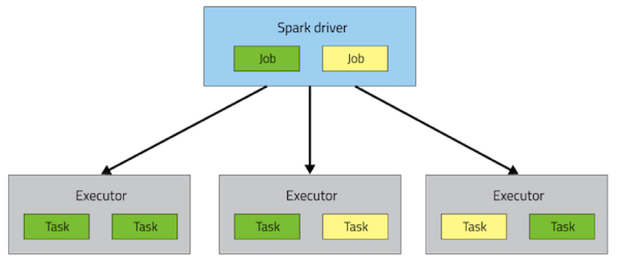
    • driver
      • A Spark application consists of a single driver process and a set of executor processes scattered across nodes on the cluster
      • The driver is the process that is in charge of the high-level control flow of work that needs to be done
    • job
      • At the top of the execution hierarchy are jobs. Invoking an action inside a Spark application triggers the launch of a Spark job to fulfill it
    • stage
      • To decide what this job looks like, Spark examines the graph of RDDs on which that actiondepends and formulates an execution plan
      • The execution plan consists of assembling the job’s transformations into stages. A stagecorresponds to a collection of tasks that all execute the same code, each on a different subset of the data. Each stage contains a sequence of transformations that can be completed without shuffling the full data (wide dependency is the delimiter of two adjacent stages)
    • node & cluster
      • node is every machine in the cluster
    • task & executor
      • Spark breaks up the processing of RDD operations into tasks (one partition per task), each of which is executed by an executor
      • Executor consists of multiple tasks
      • The executor processes are responsible for executing this work, in the form of tasks, as well as for storing any data that the user chooses to cache
    1.4 Miscellaneous
    • Closure
      • The closure is those variables and methods which must be visible for the executor to perform its computations on the RDD (in this case foreach()). This closure is serialized and sent to each executor.
      • The variables within the closure sent to each executor are now copies and thus, when counter is referenced within the foreach function, it’s no longer the counter on the drivernode. There is still a counter in the memory of the driver node but this is no longer visible to the executors! The executors only see the copy from the serialized closure. Thus, the final value of counter will still be zero since all operations on counter were referencing the value within the serialized closure.
      • To ensure well-defined behavior in these sorts of scenarios one should use an AccumulatorAccumulators in Spark are used specifically to provide a mechanism for safely updating a variable when execution is split up across worker nodes in a cluster.
    counter = 0
    rdd = sc.parallelize(data)
    
    # Wrong: Don't do this!!
    def increment_counter(x):
        global counter
        counter += x
    rdd.foreach(increment_counter)
    
    print("Counter value: ", counter)
    
    • PairRDDFunctions
      • Some RDD functions can only be applied to RDD with structure like (key, value) pairs.
      • The most common ones are distributed “shuffle” operations, such as grouping or aggregating the elements by a key.
      • E.g. groupByKey(), reduceByKey(), join().
    • Shuffle
      • Spark’s mechanism for re-distributing data so that it’s grouped differently across partitions. This typically involves copying data across executors and machines, making the shuffle a complex and costly operation.
      • During computations, a single task will operate on a single partition - thus, to organize all the data for a single reduceByKey reduce task to execute, Spark needs to perform an all-to-all operation. It must read from all partitions to find all the values for all keys, and then bring together values across partitions to compute the final result for each key - this is called the shuffle.
      • Operations which can cause a shuffle:
        • repartition operations like repartition and coalesce
        • *ByKey operations (except for counting) like groupByKey and reduceByKey
        • join operations like cogroup and join
      • The Shuffle is an expensive operation since it involves disk I/O, data serialization, and network I/O. To organize data for the shuffle, Spark generates sets of tasks - map tasksto organize the data, and a set of reduce tasks to aggregate it.
    • RDD Persistence
      • When you persist an RDD, each node stores any partitions of it that it computes in memory and reuses them in other actions on that dataset (or datasets derived from it). This allows future actions to be much faster (often by more than 10x). Caching is a key tool for iterative algorithms and fast interactive use.
      • Spark’s cache is fault-tolerant
        • if any partition of an RDD is lost, it will automatically be recomputed using the transformations that originally created it.
      • persist(StorageLevel.MEMORY_ONLY) = cache()
      • storage level
        • E.g. MEMORY_ONLY, MEMORY_AND_DISK, MEMORY_ONLY_SER, DISK_ONLY.
        • N.B. In Python, stored objects will always be serialized with the Pickle library, so it does not matter whether you choose a serialized level. The available storage levels in Python include MEMORY_ONLY, MEMORY_ONLY_2, MEMORY_AND_DISK, MEMORY_AND_DISK_2, DISK_ONLY, and DISK_ONLY_2.
    • Shared Variables
      • Broadcast
        • to keep a read-only variable cached on each machine rather than shipping a copy of it with tasks. They can be used, for example, to give every node a copy of a large input dataset in an efficient manner.
        • broadcastVar = sc.broadcast([1, 2, 3])
      • Accumulator
        • Accumulators are variables that are only “added” to through an associative ($a+b=b+a$) and commutative ($(a+b)+c=a+(b+c)$) operation and can therefore be efficiently supported in parallel.
        • They can be used to implement counters (as in MapReduce) or sums.
        • accum = sc.accumulator(0)

    2. Tuning

    • RDD accessing method or variable in class instance
      • It is also possible to pass a reference to a method in a class instance, this requires sending the object that contains that class along with the method. Likewise, accessing fields of the outer object will reference the whole object.
        class MyClass(object):
          def func(self, s):
            return s
          def doStuff(self, rdd):
            return rdd.map(self.func)
    
       class MyClass(object):
          def __init__(self):
            self.field = "Hello"
          def doStuff(self, rdd):
            return rdd.map(lambda s: self.field + s)
    
        # To avoid this issue, the simplest way is to copy field into  
        # a local variable instead of accessing it externally.
    
        def doStuff(self, rdd):
          field = self.field
          return rdd.map(lambda s: field + s)
    
    • Printing elements of RDD
      • collect() method will retrieve all elements back to driver node, which may cause OOM.
      • If only a few elements is required, take(n) method could be applied to retrieve first n elements.
    • Repartition and sort (Secondary Sort)
      • repartitionAndSortWithinPartitions to efficiently sort partitions while simultaneously repartitioning
    • Which storage level to choose
      • provide different trade-offs between memory usage and CPU efficiency
      • If your RDDs fit comfortably with the default storage level (MEMORY_ONLY), leave them that way. This is the most CPU-efficient option, allowing operations on the RDDs to run as fast as possible.
      • If not, try using MEMORY_ONLY_SER and selecting a fast serialization library (E.g. Kryo) to make the objects much more space-efficient, but still reasonably fast to access. (Java and Scala)
      • Don’t spill to disk unless the functions that computed your datasets are expensive, or they filter a large amount of the data. Otherwise, recomputing a partition may be as fast as reading it from disk.
      • Use the replicated storage levels if you want fast fault recovery (e.g. if using Spark to serve requests from a web application). All the storage levels provide full fault tolerance by recomputing lost data, but the replicated ones let you continue running tasks on the RDD without waiting to recompute a lost partition.
    • Join optimization
      • If two datasets (Big and small in size respectively) intend to join together, the shuffle of big datasets will cause performance penalty. Thus a better way to do that is broadcast the small-in-size dataset and a map transformation can then reference the hash table to do lookups.
      • Spark can also use the Kryo library (version 2) to serialize objects more quickly. Kryo is significantly faster and more compact than Java serialization (often as much as 10x), but does not support all Serializable types and requires you to register the classes you’ll use in the program in advance for best performance. Which should always be considered firstly.
    • Level of Parallelism
      • In general, 2-3 tasks/partitions per CPU core in your cluster is recommended.
      • Sometimes, you will get an OOM not because your RDDs don’t fit in memory, but because the working set of one of your tasks, such as one of the reduce tasks in groupByKey, was too large. Spark’s shuffle operations (sortByKey, groupByKey, reduceByKey, join, etc) build a hash table within each task to perform the grouping, which can often be large. The simplest fix here is to increase the level of parallelism, so that each task’s input set is smaller. Spark can efficiently support tasks as short as 200 ms, because it reuses one executor JVM across many tasks and it has a low task launching cost, so you can safely increase the level of parallelism to more than the number of cores in your clusters.
    • Broadcast large variables
      • Using the broadcast functionality available in SparkContext can greatly reduce the size of each serialized task, and the cost of launching a job over a cluster. If your tasks use any large object from the driver program inside of them (e.g. a static lookup table), consider turning it into a broadcast variable. Spark prints the serialized size of each task on the master, so you can look at that to decide whether your tasks are too large; in general tasks larger than about 20 KB are probably worth optimizing.
      • repartition() the number of partitions can be increased/decreased, but with coalesce() the number of partitions can only be decreased
      • coalesce() avoids a full shuffle. If it's known that the number is decreasing, then the executor can safely keep data on the minimum number of partitions, only moving the data off the extra nodes, onto the nodes that we kept.
    Node 1 = 1,2,3
    Node 2 = 4,5,6
    Node 3 = 7,8,9
    Node 4 = 10,11,12
    Then coalesce() down to 2 partitions:
    
    Node 1 = 1,2,3 + (10,11,12)
    Node 3 = 7,8,9 + (4,5,6)
    Notice that Node 1 and Node 3 did not require its original data to move.
    
    • Avoid groupByKey()
      • Avoid groupByKey and use reduceByKey or combineByKey instead.
        • groupByKey shuffles all the data, which is slow.
        • reduceByKey shuffles only the results of sub-aggregations in each partition of the data (like the combiner in MapReduce).
        • Consequently, if we intend to do groupByKey and then reduce, we should apply reduceByKey instead.
    • Avoid reduceByKey() When the input and output value types are different.
      • For example, consider writing a transformation that finds all the unique strings corresponding to each key. One way would be to use map to transform each element into a Set and then combine the Sets with reduceByKey.
      • This would result in tons of unnecessary object creation because a new set must be allocated for each record. It’s better to use aggregateByKey, which performs the map-side aggregation more efficiently
    • Avoid the flatMap-join-groupBy pattern
      • When two datasets are already grouped by key and you want to join them and keep them grouped, you can just use cogroup. That avoids all the overhead associated with unpacking and repacking the groups.
    • Read compressed file
      • Since comppressed file is not splittable, there will be only 1 partition for the created RDD. So we need to do repartition() after reading the file into RDD.
      • It's always better to check partition number after reading a file to make sure it could take full advantage of cluster's capacity.
    • Tuning parallelism & resource (memory, vcore)

    Reference