Showing posts with label HDFS. Show all posts
Showing posts with label HDFS. Show all posts
Tuesday, April 17, 2018
Solution For "Error: java.io.IOException: org.apache.parquet.io.ParquetDecodingException: Can not read value at 0 in block -1 in file" in HDFS
This is due to the Schema Revolution feature of parquet files and the column name of that parquet file may have changed before. so try to apply `set parquet.column.index.access=true` and the issue is solved.

Wednesday, July 8, 2015
Issue Related With The Owner Of Hive Dirs/Files Created On HDFS is Not The User Executing Hive Command (Hive User Impersonation)
When executing hive command from one of our gateways in any user 'A', then doing some operations which will create files/dirs to hive warehouse on HDFS, the owner of newly-created files/dirs will always be 'supertool', which is the creator of hiveserver2(metastore) process, whichever user 'A' is:
This can be explained by Hive User Impersonation. By default, HiveServer2 performs the query processing as the user who submitted the query. But if related parameters, which are as follows, are set wrongly, the query will run as the user that the hiveserver2 process runs as. The correct way to configure is as below:
The above settings is self-explained well in their descriptions. Thus there's a need to rectify our hive-site.xml and then restart our hiveserver2(metastore) service.
At this point, there's a puzzling problem that no matter how I change my HIVE_HOME/conf/hive-site.xml, the corresponding setting is not altered at runtime. Eventually, I found that there's another hive-site.xml under HADOOP_HOME/etc/hadoop directory. Consequently, it is advised that we should not put any hive-related configuration files under HADOOP_HOME directory in avoidance of confusion. The official configuration files loading order of precedence can be found at REFERENCE_5.
After revising HIVE_HOME/conf/hive-site.xml, the following commands have guaranteed that the preceding problem is addressed properly.
In which, `set system:user.name` will display current user executing hive command; `set [parameter]` will display the specific parameter's value at runtime. Alternatively, we could list all runtime parameters via `set` command in hive, or from command line: `hive -e "set;" > hive_runtime_parameters.txt`.
A possible exception 'TTransportException: Could not create ServerSocket on address 0.0.0.0/0.0.0.0:9083' will be complained when launching metastore service. According to REFERENCE_6, this is because another metastore or sort of service occupies 9083 port, which is the default port for hive metastore. Kill it beforehand:
In this way, we could create database/table again, the owner of corresponding HDFS files/dirs will be changed to the user invoking hive command.
REFERENCE:
1. Setting Up HiveServer2 - Impersonation
2. hive-default.xml.template [hive.metastore.execute.setugi]
3. Hive User Impersonation -mapr
4. Configuring User Impersonation with Hive Authorization - drill
5. AdminManual Configuration - hive [order of precedence]
6. TTransportException: Could not create ServerSocket on address 0.0.0.0/0.0.0.0:9083 - cloudera community
###-- hiveserver2(metastore) belongs to user 'supertool' --
K1201:~>ps aux | grep -v grep | grep metastore.HiveMetaStore --color
500      30320  0.0  0.5 1209800 263548 ?      Sl   Jan28  59:29 /usr/java/jdk1.7.0_11//bin/java -Xmx10000m -Djava.net.preferIPv4Stack=true -Dhadoop.log.dir=/home/workspace/hadoop/logs -Dhadoop.log.file=hadoop.log -Dhadoop.home.dir=/home/workspace/hadoop -Dhadoop.id.str=supertool -Dhadoop.root.logger=INFO,console -Djava.library.path=/home/workspace/hadoop/lib/native -Dhadoop.policy.file=hadoop-policy.xml -Djava.net.preferIPv4Stack=true -Xmx512m -Dhadoop.security.logger=INFO,NullAppender org.apache.hadoop.util.RunJar /home/workspace/hive-0.13.0-bin/lib/hive-service-0.13.0.jar org.apache.hadoop.hive.metastore.HiveMetaStore
K1201:~>cat /etc/passwd | grep 500
supertool:x:500:500:supertool:/home/supertool:/bin/bash

###-- invoke hive command in user 'withdata' and create a database and table --
114:~>whoami
withdata
114:~>hive
hive> create database test_db;
OK
Time taken: 1.295 seconds
hive> use test_db;
OK
Time taken: 0.031 seconds
hive> create table test_tbl(id int);
OK
Time taken: 0.864 seconds

###-- the newly-created database and table belongs to user 'supertool' --
114:~>hadoop fs -ls /user/supertool/hive/warehouse | grep test_db
drwxrwxr-x   - supertool    supertool             0 2015-07-08 15:13 /user/supertool/hive/warehouse/test_db.db
114:~>hadoop fs -ls /user/supertool/hive/warehouse/test_db.db
Found 1 items
drwxrwxr-x   - supertool supertool          0 2015-07-08 15:13 /user/supertool/hive/warehouse/test_db.db/test_tbl
This can be explained by Hive User Impersonation. By default, HiveServer2 performs the query processing as the user who submitted the query. But if related parameters, which are as follows, are set wrongly, the query will run as the user that the hiveserver2 process runs as. The correct way to configure is as below:
<property>
  <name>hive.server2.enable.doAs</name>
  <value>true</value>
  <description>Set this property to enable impersonation in Hive Server 2</description>
</property>
<property>
  <name>hive.metastore.execute.setugi</name>
  <value>true</value>
  <description>Set this property to enable Hive Metastore service impersonation in unsecure mode. In unsecure mode, setting this property to true will cause the metastore to execute DFS operations using the client's reported user and group permissions. Note that this property must be set on both the client and server sides. If the client sets it to true and the server sets it to false, the client setting will be ignored.</description>
</property>
The above settings is self-explained well in their descriptions. Thus there's a need to rectify our hive-site.xml and then restart our hiveserver2(metastore) service.
At this point, there's a puzzling problem that no matter how I change my HIVE_HOME/conf/hive-site.xml, the corresponding setting is not altered at runtime. Eventually, I found that there's another hive-site.xml under HADOOP_HOME/etc/hadoop directory. Consequently, it is advised that we should not put any hive-related configuration files under HADOOP_HOME directory in avoidance of confusion. The official configuration files loading order of precedence can be found at REFERENCE_5.
After revising HIVE_HOME/conf/hive-site.xml, the following commands have guaranteed that the preceding problem is addressed properly.
###-- check runtime hive parameters related with hive user impersonation --
k1227:/home/workspace/hive-0.13.0-bin>hive
hive> set system:user.name;
system:user.name=hadoop
hive> set hive.server2.enable.doAs;
hive.server2.enable.doAs=true
hive> set hive.metastore.execute.setugi;
hive.metastore.execute.setugi=true

###-- start hiveserver2(metastore) again --
k1227:/home/workspace/hive-0.13.0-bin>hive --service metastore
Starting Hive Metastore Server
15/07/08 14:28:59 INFO Configuration.deprecation: mapred.reduce.tasks is deprecated. Instead, use mapreduce.job.reduces
15/07/08 14:28:59 INFO Configuration.deprecation: mapred.min.split.size is deprecated. Instead, use mapreduce.input.fileinputformat.split.minsize
15/07/08 14:28:59 INFO Configuration.deprecation: mapred.reduce.tasks.speculative.execution is deprecated. Instead, use mapreduce.reduce.speculative
15/07/08 14:28:59 INFO Configuration.deprecation: mapred.min.split.size.per.node is deprecated. Instead, use mapreduce.input.fileinputformat.split.minsize.per.node
15/07/08 14:28:59 INFO Configuration.deprecation: mapred.input.dir.recursive is deprecated. Instead, use mapreduce.input.fileinputformat.input.dir.recursive
15/07/08 14:28:59 INFO Configuration.deprecation: mapred.min.split.size.per.rack is deprecated. Instead, use mapreduce.input.fileinputformat.split.minsize.per.rack
15/07/08 14:28:59 INFO Configuration.deprecation: mapred.max.split.size is deprecated. Instead, use mapreduce.input.fileinputformat.split.maxsize
15/07/08 14:28:59 INFO Configuration.deprecation: mapred.committer.job.setup.cleanup.needed is deprecated. Instead, use mapreduce.job.committer.setup.cleanup.needed
15/07/08 14:28:59 WARN conf.HiveConf: DEPRECATED: Configuration property hive.metastore.local no longer has any effect. Make sure to provide a valid value for hive.metastore.uris if you are connecting to a remote metastore.
15/07/08 14:28:59 WARN conf.HiveConf: DEPRECATED: hive.metastore.ds.retry.* no longer has any effect.  Use hive.hmshandler.retry.* instead
SLF4J: Class path contains multiple SLF4J bindings.
SLF4J: Found binding in [jar:file:/home/workspace/hadoop/share/hadoop/common/lib/slf4j-log4j12-1.7.5.jar!/org/slf4j/impl/StaticLoggerBinder.class]
SLF4J: Found binding in [jar:file:/home/workspace/hive-0.13.0-bin/lib/jud_test.jar!/org/slf4j/impl/StaticLoggerBinder.class]
SLF4J: See http://www.slf4j.org/codes.html#multiple_bindings for an explanation.
SLF4J: Actual binding is of type [org.slf4j.impl.Log4jLoggerFactory]
^Z
[1]+  Stopped                 hive --service metastore
k1227:/home/workspace/hive-0.13.0-bin>bg 1
[1]+ hive --service metastore &
k1227:/home/workspace/hive-0.13.0-bin>ps aux | grep metastore
hadoop    6597 26.6  0.4 1161404 275564 pts/0  Sl   14:28   0:14 /usr/java/jdk1.7.0_11//bin/java -Xmx20000m -Djava.net.preferIPv4Stack=true -Dhadoop.log.dir=/home/workspace/hadoop/logs -Dhadoop.log.file=hadoop.log -Dhadoop.home.dir=/home/workspace/hadoop -Dhadoop.id.str=hadoop -Dhadoop.root.logger=INFO,console -Djava.library.path=/home/workspace/hadoop/lib/native -Dhadoop.policy.file=hadoop-policy.xml -Djava.net.preferIPv4Stack=true -Xmx512m -Dhadoop.security.logger=INFO,NullAppender org.apache.hadoop.util.RunJar /home/workspace/hive-0.13.0-bin/lib/hive-service-0.13.0.jar org.apache.hadoop.hive.metastore.HiveMetaStore
hadoop   11936  0.0  0.0 103248   868 pts/0    S+   14:29   0:00 grep metastore
In which, `set system:user.name` will display current user executing hive command; `set [parameter]` will display the specific parameter's value at runtime. Alternatively, we could list all runtime parameters via `set` command in hive, or from command line: `hive -e "set;" > hive_runtime_parameters.txt`.
A possible exception 'TTransportException: Could not create ServerSocket on address 0.0.0.0/0.0.0.0:9083' will be complained when launching metastore service. According to REFERENCE_6, this is because another metastore or sort of service occupies 9083 port, which is the default port for hive metastore. Kill it beforehand:
k1227:/home/workspace/hive-0.13.0-bin>lsof -i:9083
COMMAND  PID   USER   FD   TYPE     DEVICE SIZE/OFF NODE NAME
java    3499 hadoop  236u  IPv4 3913377019      0t0  TCP *:9083 (LISTEN)
k1227:/home/workspace/hive-0.13.0-bin>kill -9 3499
In this way, we could create database/table again, the owner of corresponding HDFS files/dirs will be changed to the user invoking hive command.
REFERENCE:
1. Setting Up HiveServer2 - Impersonation
2. hive-default.xml.template [hive.metastore.execute.setugi]
3. Hive User Impersonation -mapr
4. Configuring User Impersonation with Hive Authorization - drill
5. AdminManual Configuration - hive [order of precedence]
6. TTransportException: Could not create ServerSocket on address 0.0.0.0/0.0.0.0:9083 - cloudera community
Thursday, April 9, 2015
NameNode Hangs After Startup
Phenomenon
Recently, namenodes in our Hadoop cluster hang frequently, with the phenomenon that HDFS command will stuck or SocketTimeout will be thrown. When checking on 'hadoop-hadoop-namenode.log', no valuable information is provided. But in log 'hadoop-hadoop-namenode.out', the following error is thrown:Exception in thread "Socket Reader #1 for port 8020" java.lang.OutOfMemoryError: Java heap space Exception in thread "org.apache.hadoop.hdfs.server.namenode.FSNamesystem$NameNodeResourceMonitor@5c5df228" java.lang.OutOfMemoryError: Java heap space
In the meantime, we could diagnose the process of NameNode via `jstat` command:
[hadoop@K1201 hadoop]$ jstat -gcutil 31686
  S0     S1     E      O      P     YGC     YGCT    FGC    FGCT     GCT
  0.00   0.00 100.00 100.00  98.79     20   27.508    48  335.378  362.886
As we can see, Full GC Time (FGCT) is predominating the Total Time of GC (GCT), thus a lack of memory for NameNode is the culprit.
Solution
Apparently, namenode is complaining an OOM error. The way to increase heap space for namenode is in the configuration file '$HADOOP_HOME/etc/hadoop/hadoop-env.sh', where to put the following commands:# The maximum amount of heap to use, in MB. Default is 1000. export HADOOP_HEAPSIZE=20000 export HADOOP_NAMENODE_INIT_HEAPSIZE="15000"
Eventually, we should restart our namenode and check its current -Xmx (which stands for heap size) attribute via:
jinfo <namenode_PID> | grep -i xmx --color
We shall see that it has already changed to what we've set previously.
Alternatively, we could check memory status via HDFS monitor webpage as well:

Wednesday, January 21, 2015
Note On NameNode HA
The overall procedure is well-explained in the references listed at the bottom. Here's just some essential points that I want to emphasize.
Here's the configurations for our Hadoop cluster, which is all related with NameNode HA:
After Hadoop cluster is fully started, there are some checkpoints that should be verified to make sure NameNode HA is fully applied:
1. Nodes corresponding to "dfs.ha.namenodes.ns1" argument in hdfs-site.xml should have processes named "DFSZKFailoverController", "NameNode".
2. Nodes corresponding to "dfs.namenode.shared.edits.dir" argument in hdfs-site.xml should have process named "JournalNode".
3. Nodes corresponding to "ha.zookeeper.quorum" argument in core-site.xml should have process named "QuorumPeerMain".
The way to launch all the processes above, if needed to do so respectively, is listed as below:
QuorumPeerMain: The service for ZooKeeper.
bin/zkServer.sh start
bin/zkServer.sh status
bin/zkServer.sh stop
bin/zkServer.sh restart
JournalNode: In order for the Standby node to keep its state synchronized with the Active node, both nodes communicate with a group of separate daemons called "JournalNodes" (JNs)
./sbin/hadoop-daemon.sh stop journalnode
./sbin/hadoop-daemon.sh start journalnode
NameNode:
./sbin/hadoop-daemon.sh stop namenode
./sbin/hadoop-daemon.sh start namenode
DFSZKFailoverController:
./sbin/hadoop-daemon.sh stop zkfc
./sbin/hadoop-daemon.sh start zkfc
Attention that if the above command fails to start with no explicit errors, you could try executing command `./bin/hdfs zkfc` so as to retrieve detailed information.
Lastly, Some common commands relevant with NameNode HA is listed here:
Reference:
1. High Availability for Hadoop - Hortonworks
2. HDFS High Availability Using the Quorum Journal Manager - Apache Hadoop
Here's the configurations for our Hadoop cluster, which is all related with NameNode HA:
core-site.xml:
<property>
    <name>fs.defaultFS</name>
    <value>hdfs://ns1</value>
</property>

<property>
    <name>ha.zookeeper.quorum</name>
    <value>644v4.mzhen.cn:2181,644v5.mzhen.cn:2181,644v6.mzhen.cn:2181</value>
</property>

hdfs-site.xml:
<property>
    <name>dfs.nameservices</name>
    <value>ns1</value>
</property>

<property>
     <name>dfs.ha.namenodes.ns1</name>
     <value>nn1,nn2</value>
</property>

<property>
     <name>dfs.namenode.rpc-address.ns1.nn1</name>
     <value>644v1.mzhen.cn:9000</value>
</property>

<property>
     <name>dfs.namenode.rpc-address.ns1.nn2</name>
     <value>644v2.mzhen.cn:9000</value>
</property>

<property>
     <name>dfs.namenode.http-address.ns1.nn1</name>
     <value>644v1.mzhen.cn:10001</value>
</property>

<property>
     <name>dfs.namenode.http-address.ns1.nn2</name>
     <value>644v2.mzhen.cn:10001</value>
</property>

<property>
     <name>dfs.namenode.shared.edits.dir</name>
     <value>qjournal://644v4.mzhen.cn:8485;644v5.mzhen.cn:8485;644v6.mzhen.cn:8485/ns1</value>
</property>

<property>
     <name>dfs.journalnode.edits.dir</name>
     <value>/home/data/hdfsdir/journal</value>
</property>

<property>
     <name>dfs.client.failover.proxy.provider.ns1</name>
     <value>org.apache.hadoop.hdfs.server.namenode.ha.ConfiguredFailoverProxyProvider</value>
</property>

<property>
     <name>dfs.ha.fencing.methods</name>
     <value>sshfence</value>
</property>

<property>
     <name>dfs.ha.fencing.ssh.private-key-files</name>
     <value>/home/supertool/.ssh/id_rsa</value>
</property>

<property>
     <name>dfs.ha.automatic-failover.enabled</name>
     <value>true</value>
</property>
After Hadoop cluster is fully started, there are some checkpoints that should be verified to make sure NameNode HA is fully applied:
1. Nodes corresponding to "dfs.ha.namenodes.ns1" argument in hdfs-site.xml should have processes named "DFSZKFailoverController", "NameNode".
2. Nodes corresponding to "dfs.namenode.shared.edits.dir" argument in hdfs-site.xml should have process named "JournalNode".
3. Nodes corresponding to "ha.zookeeper.quorum" argument in core-site.xml should have process named "QuorumPeerMain".
The way to launch all the processes above, if needed to do so respectively, is listed as below:
QuorumPeerMain: The service for ZooKeeper.
bin/zkServer.sh start
bin/zkServer.sh status
bin/zkServer.sh stop
bin/zkServer.sh restart
JournalNode: In order for the Standby node to keep its state synchronized with the Active node, both nodes communicate with a group of separate daemons called "JournalNodes" (JNs)
./sbin/hadoop-daemon.sh stop journalnode
./sbin/hadoop-daemon.sh start journalnode
NameNode:
./sbin/hadoop-daemon.sh stop namenode
./sbin/hadoop-daemon.sh start namenode
DFSZKFailoverController:
./sbin/hadoop-daemon.sh stop zkfc
./sbin/hadoop-daemon.sh start zkfc
Attention that if the above command fails to start with no explicit errors, you could try executing command `./bin/hdfs zkfc` so as to retrieve detailed information.
Lastly, Some common commands relevant with NameNode HA is listed here:
## Get the status of NameNode, active or standby.
hdfs haadmin -getServiceState nn1

## Transfer a NameNode to active manually, which requires 'dfs.ha.automatic-failover.enabled' be set to 'false'.
hdfs haadmin -transitionToActive nn1
Reference:
1. High Availability for Hadoop - Hortonworks
2. HDFS High Availability Using the Quorum Journal Manager - Apache Hadoop
Saturday, November 29, 2014
Configure Firewall In Iptables For Hadoop Cluster
Security Problem
As for HDFS, which is configured along with Hadoop, the 'dfs.namenode.http-address' parameter in hdfs-site.xml specifies an URL which is used to monitoring HDFS:<property> <name>dfs.nameservices</name> <value>ns1</value> </property> <property> <name>dfs.ha.namenodes.ns1</name> <value>nn1,nn2</value> </property> <property> <name>dfs.namenode.rpc-address.ns1.nn1</name> <value>k1201.hide.cn:8020</value> </property> <property> <name>dfs.namenode.rpc-address.ns1.nn2</name> <value>k1202.hide.cn:8020</value> </property> <property> <name>dfs.namenode.http-address.ns1.nn1</name> <value>k1201.hide.cn:50070</value> </property> <property> <name>dfs.namenode.http-address.ns1.nn2</name> <value>k1202.hide.cn:50070</value> </property>
After HDFS service is on, the HDFS monitoring webpage just looks like below:
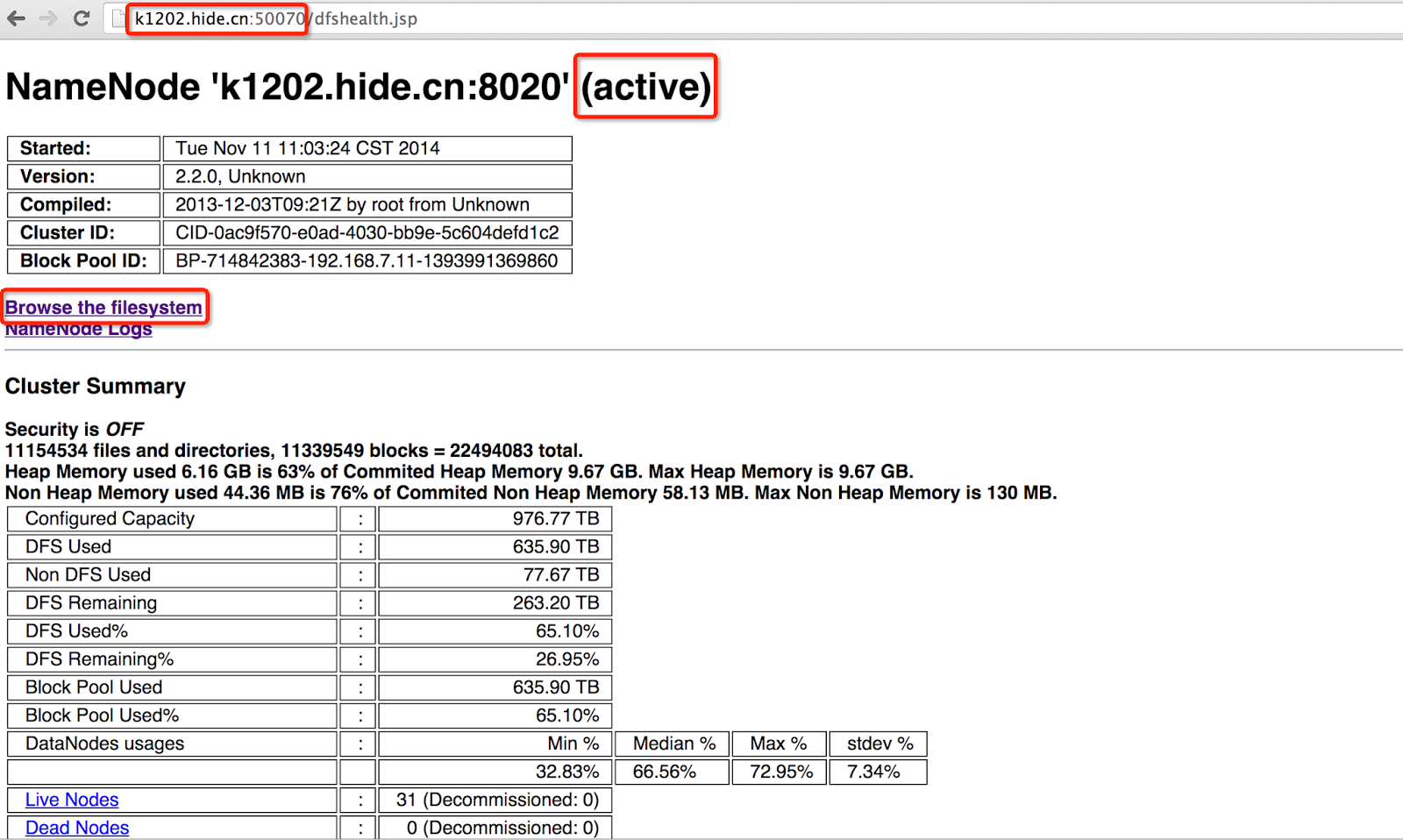
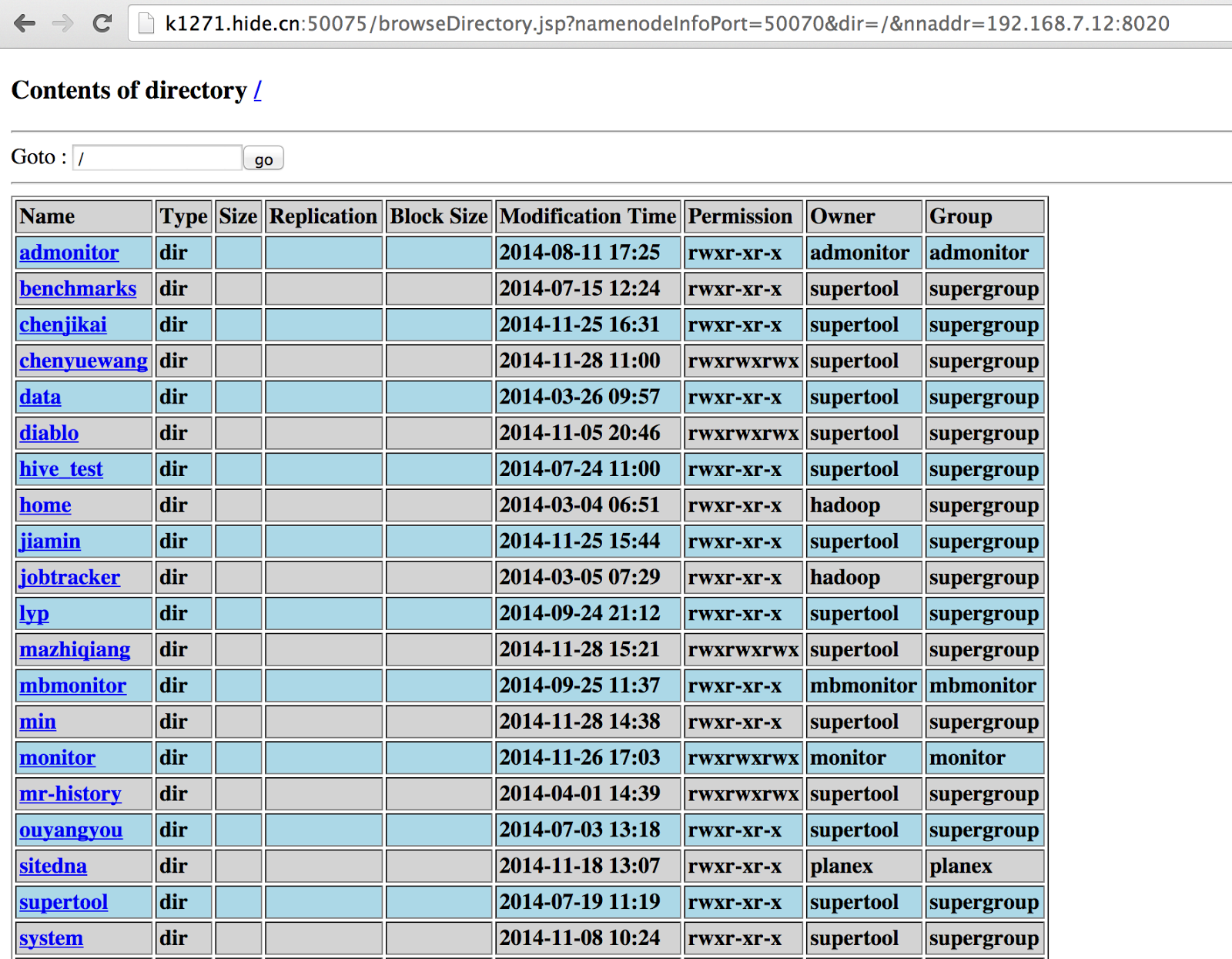
If clicking 'Browse the filesystem' , we could explore and download ALL DATA stored in HDFS, which is virtually not what we want.
Configuration For Iptables
Firstly, erase all current iptables rules should iptbales is on. The reason that we have to explicitly state INPUT, FORWARD, OUTPUT to ACCEPT is that no packet can pass into that machine after we execute flush if one of them is set default to DROP./sbin/iptables --policy INPUT ACCEPT /sbin/iptables --policy FORWARD ACCEPT /sbin/iptables --policy OUTPUT ACCEPT /sbin/iptables --flush
The final target of our settings in iptables is to block all kinds of TCP connections (apart from SSH) from external IP address to nodes in Hadoop cluster, whereas the reverse direction is allowed. In the meantime, connections among nodes in Hadoop cluster should not be restricted. Here's the command to achieve this:
iptables -L -v -n
iptables -A INPUT -s 192.168.0.0/255.255.0.0 -j ACCEPT
iptables -A OUTPUT -d 192.168.0.0/255.255.0.0 -j ACCEPT
iptables -A INPUT -s 127.0.0.1 -j ACCEPT
iptables -A OUTPUT -d 127.0.0.1 -j ACCEPT
iptables -A INPUT -p tcp --dport ssh -j ACCEPT
iptables -A OUTPUT -p tcp --sport ssh -j ACCEPT
iptables -A INPUT -m state --state ESTABLISHED,RELATED,UNTRACKED -j ACCEPT
iptables --policy INPUT DROP
iptables --policy OUTPUT ACCEPT
- `-L` will show current rules set in iptables, and will start iptables provided the service is off. `-v` will show detailed packet and byte info. `-n` will disable all DNS resolution in the output results.
- The next two lines of rule will allow any packet that are from node with LAN IP 192.168.*.* going in and out.
- The fourth and fifth line of rule accepts any packet that are from localhost/127.0.0.1.
- The sixth and seventh line of rule will accept ssh connection from any source, namely LAN IP and external IP.
- The eighth line of rule will allow all TCP INPUT whose state is ESTABLISHED, RELATED or UNTRACKED, purpose of which is allowing all Hadoop nodes to start TCP connection with external IP and the external one can send back packets successfully.
- The last two lines of rule set the default policy of INPUT and OUTPUT to DROP, so as to block anything if a packet is not matched by the above rules.
After setting, run the following command again to double check whether rules have been configured successfully or not.
$ iptables -L -v -n

Chain INPUT (policy DROP 199 packets, 66712 bytes)
 pkts bytes target     prot opt in     out     source               destination
4243K 3906M ACCEPT     all  --  *      *       192.168.0.0/16       0.0.0.0/0
  409 47240 ACCEPT     all  --  *      *       127.0.0.1            0.0.0.0/0
    0     0 ACCEPT     tcp  --  *      *       0.0.0.0/0            0.0.0.0/0           tcp dpt:22
  119 19947 ACCEPT     all  --  *      *       0.0.0.0/0            0.0.0.0/0           state RELATED,ESTABLISHED,UNTRACKED

Chain FORWARD (policy ACCEPT 0 packets, 0 bytes)
 pkts bytes target     prot opt in     out     source               destination

Chain OUTPUT (policy ACCEPT 131 packets, 9395 bytes)
 pkts bytes target     prot opt in     out     source               destination
1617K 6553M ACCEPT     all  --  *      *       0.0.0.0/0            192.168.0.0/16
  409 47240 ACCEPT     all  --  *      *       0.0.0.0/0            127.0.0.1
    0     0 ACCEPT     tcp  --  *      *       0.0.0.0/0            0.0.0.0/0           tcp spt:22
If all is correct, remember to make it persistent via the following command. If not, iptables will reload the persistent iptables-config file, which may be a stale version of iptables rules, at the time the machine restarts.
/sbin/iptables-save > /etc/sysconfig/iptables
From my own Mac, which is external IP of course, run the following command in order to check whether the specific port in that Hadoop node is available or not.
telnet 644v(1/2/3).hide.cn 22                 #Success!
telnet 644v(1/2/).hide.cn 50070               #Fail
telnet 644v(1/2/3).hide.cn 50075              #Fail
telnet 644v(1/2/).hide.cn 9000                #Fail

# Or in a more elegant way:
$ nmap -sT -sV -Pn 644v*.hide.cn
Starting Nmap 6.47 ( http://nmap.org ) at 2014-12-01 10:40 HKT
Nmap scan report for *.hide.cn (xx.xx.xx.xx)
Host is up (0.017s latency).
rDNS record for xx.xx.xx.xx: undefine.inidc.com.cn
Not shown: 999 filtered ports
PORT   STATE SERVICE VERSION
22/tcp open  ssh     OpenSSH 4.3 (protocol 2.0)
In the above, 50070 is set by 'dfs.namenode.http-address', 50075 is set by 'dfs.datanode.http.address', and 9000 is set by 'dfs.namenode.rpc-address'. All these parameters are configured in hdfs-site.xml.
After configuring, we SSH to a node in Hadoop cluster, executing `hadoop jar share/hadoop/mapreduce/hadoop-mapreduce-examples-2.2.0.jar wordcount input output` and it turns out successful.
Proxy Setting For Hadoop Cluster
After starting iptables, we are not able to access HDFS and YARN monitoring webpages from external IP anymore. The easiest way to solve this problem elegantly is to set dynamic port forwarding via `ssh`.Only two commands are required to invoke on our own PC:
netstat -an | grep 7001
ssh -D 7001 supertool@644v3.hide.cn
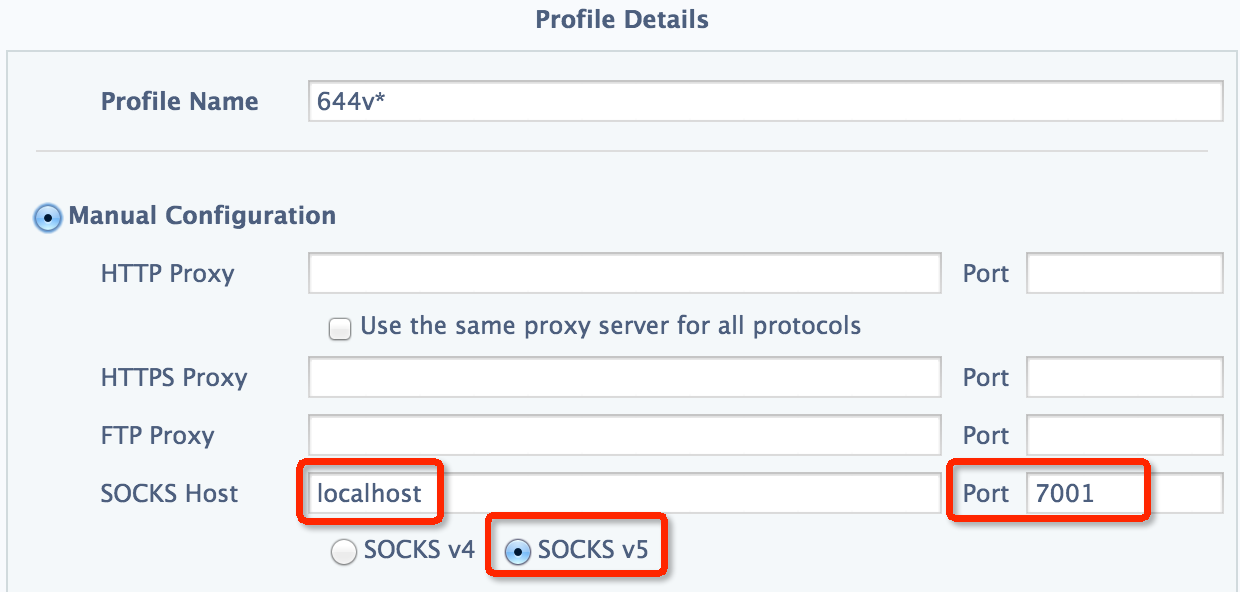
The purpose of first command is to check whether port 7001 has been occupied by other programs. If not, the second command will create a socks tunnel from our own PC to the node in Hadoop cluster via ssh. All packets sending to port 7001 in our PC will forward to that node in Hadoop cluster.
As for chrome, we could configure it in SwitchySharp, which is quite simple and handy, as below:
However, since the node in Hadoop cluster is not accessible to external IP, we are not capable of surfing the Internet like youtube or twitter as well as monitoring on the HDFS or YARN webpage simultaneously provided configuration of proxy is set in the above manner.
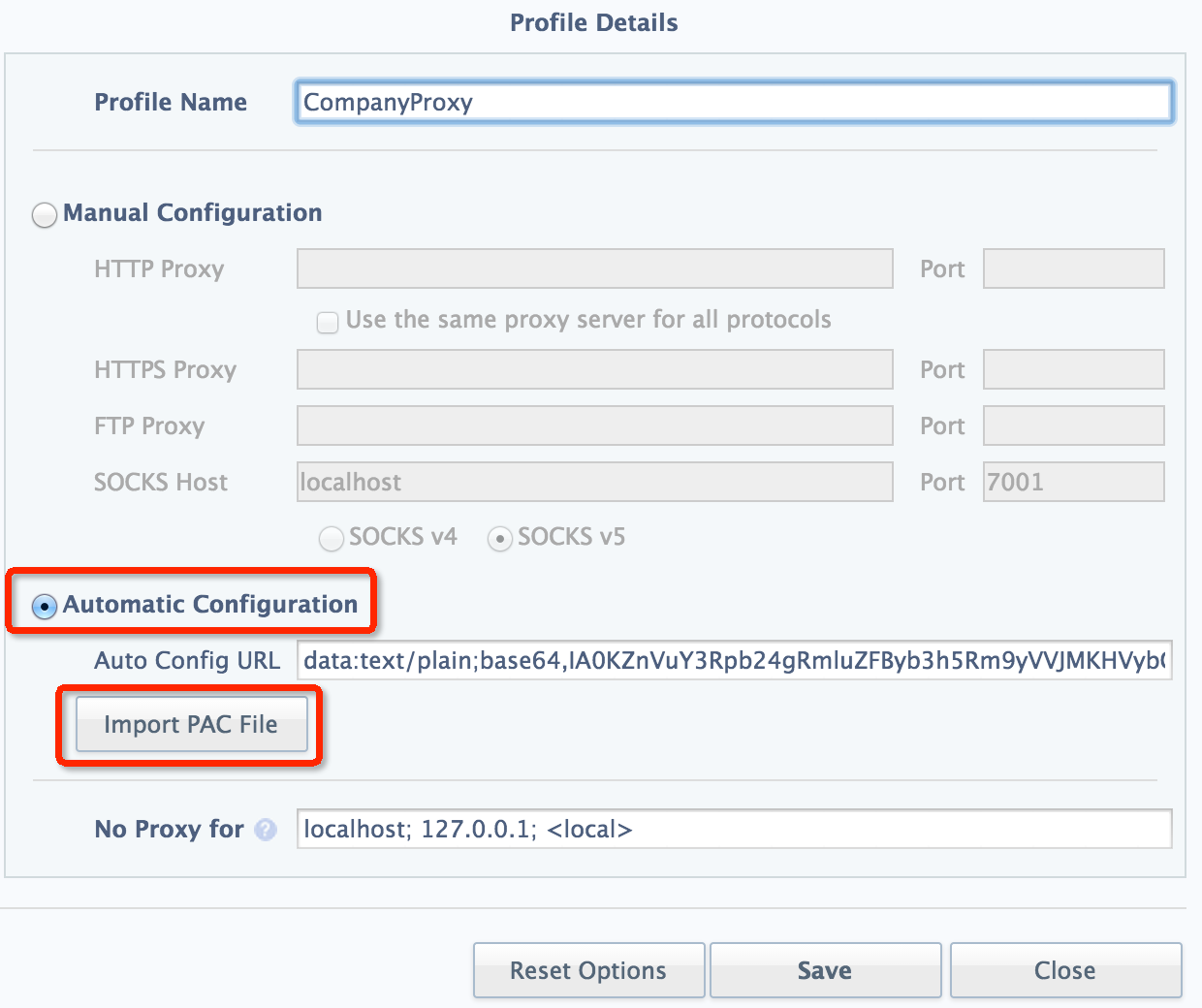
Consequently, I write a custom PAC file which looks like below:
function FindProxyForURL(url,host)
{
   if(host.indexOf("hide") > -1)
       return "SOCKS5 127.0.0.1:7001";
   return "DIRECT";
}
In which, "hide" is the keyword of our host for HDFS and YARN monitoring webpage. If "hide" appears in the host name, use the SOCKS5 proxy, and direct connection is applied otherwise.
Finally, import this PAC file in SwitchySharp:
If this proxy is set on another node rather than localhost, we have to add '-g' parameter, which is well-explained in document: "Allows remote hosts to connect to local forwarded ports", to accept external IP other than mere localhost.
ssh -g -D 7001 supertool@644v3.hide.cn
References:
- the-beginners-guide-to-iptables-the-linux-firewall
- 25 Most Frequently Used Linux IPTables Rules Examples
- Configuring iptables - HortonWorks
- SSH Forward - IBM
- SSH Port Forwarding
- pac-functions
© 2014-2017 jason4zhu.blogspot.com All Rights Reserved
If transfering, please annotate the origin: Jason4Zhu
Friday, November 21, 2014
Some Mapper Tasks In Hadoop Hang For A Long Time With Epollwait Shown By Jstack
Phenomenon
When running our scheduled jobs at night, there will be some mapper task attempts hang without any progress for so long a time. According to Buckets Effect, the total time is determined by the shortest end. Thus, elapsed time of our job is dragged longer than it's supposed to be:


Footprint Of Solution
At first, we intend to ssh on that specific machine where the stuck mapper task attempt is running to check out what is going on, but ssh is stuck too. We check on ganglia, the total consumption of CPU, network IO as well as memory is relatively low, which means that all of them is not the bottleneck of this problem.After this machine recovers, we login on it and check out the message buffer of the kernel, a mountain of "TCP: too many of orphaned sockets" is printed on screen:
> su root
> dmesg
Out of socket memory
TCP: too many of orphaned sockets
TCP: too many of orphaned sockets
TCP: too many of orphaned sockets
TCP: too many of orphaned sockets
TCP: too many of orphaned sockets
TCP: too many of orphaned sockets
TCP: too many of orphaned sockets
TCP: too many of orphaned sockets
...
In general, there are two possibilities which can cause "Out of socket memory", namely:
- The server is running out of TCP memory
- There are too many orphaned sockets on the system
For the first case, we can check the setting of TCP memory by:
tcp_mem is a vector of 3 integers: min, pressure and max.cat /proc/sys/net/ipv4/tcp_mem 196608 262144 393216
- min : below this number of pages TCP is not bothered about its memory consumption.
- pressure: when the amount of memory allocated to TCP by the kernel exceeds this threshold, the kernel starts to moderate the memory consumption. This mode is exited when memory consumption falls under min.
- max : the max number of pages allowed for queuing by all TCP sockets. When the system goes above this threshold, the kernel will start throwing the "Out of socket memory" error in the logs.
For the second case, the setting of max_orphan is shown by:
cat /proc/sys/net/ipv4/tcp_max_orphans
300000
The way to check out current orphan amount and TCP memory use is as follows:
cat /proc/net/sockstat
sockets: used 755
TCP: inuse 103 orphan 0 tw 0 alloc 308 mem 221
UDP: inuse 10 mem 0
RAW: inuse 0
FRAG: inuse 0 memory 0
In order to monitor on the current orphan amount as well as TCP memory use, I write a script:
//--orphan.sh--
#!/bin/bash
while true
do
date >> /home/hadoop/orphan.out
cat /proc/net/sockstat >> /home/hadoop/orphan.out
echo "" >> /home/hadoop/orphan.out
sleep 5
done


//--orphan distribution shell--
for i in $(cat $HADOOP_HOME/etc/hadoop/slaves | grep -v "#")
do
echo $i
scp orphan.sh hadoop@$i:/home/hadoop/;
ssh hadoop@$i "nohup bash orphan.sh 2>&1 &" &
done
After some time, I count on all the collected log in every node to see how many times each condition is triggered. For the first case, no orphan amount is greater than max_orphan. For the second case, there are some nodes in our Hadoop cluster that always exceed the max of TCP memory frequently:
for i in $(cat etc/hadoop/slaves | grep -v '#'); do out_mem=$(ssh hadoop@$i "grep TCP orphan.out | awk '{if(\$NF > 393216)print}' |wc -l"); echo $i, $out_mem; done
Surprisingly, all the problem-related nodes are relatively new, and are forgotten to tuning on TCP configurations. The reference for tuning is from Tuning Hadoop on Dell PowerEdge Servers.
Related commands for `sysctl`:
// The file to configure custom paramters.
vim /etc/sysctl.conf

// Command to list all configurations in sysctl.
/sbin/sysctl -a
The sysctl.conf of tuned node:
fs.file-max = 800000
net.core.rmem_default = 12697600
net.core.wmem_default = 12697600
net.core.rmem_max = 873800000
net.core.wmem_max = 655360000
net.ipv4.tcp_rmem = 8192 262144 4096000
net.ipv4.tcp_wmem = 4096 262144 4096000
net.ipv4.tcp_mem = 196608 262144 3145728
net.ipv4.tcp_max_orphans = 300000
net.ipv4.tcp_tw_reuse = 1
net.ipv4.tcp_tw_recycle = 1
net.ipv4.ip_local_port_range = 1025 65535
net.ipv4.tcp_max_syn_backlog = 100000
net.ipv4.tcp_fin_timeout = 30
net.ipv4.tcp_keepalive_time = 1200
net.ipv4.tcp_max_tw_buckets = 5000
net.ipv4.netfilter.ip_conntrack_tcp_timeout_established = 1500
net.core.somaxconn=32768
vm.swappiness=0
The difference between tuned and non-tuned nodes is shown as below:
//—- tuned --
fs.file-max = 800000
net.core.rmem_default = 12697600
net.core.wmem_default = 12697600
net.core.rmem_max = 873800000
net.core.wmem_max = 655360000
net.ipv4.tcp_rmem = 8192 262144 4096000
net.ipv4.tcp_wmem = 4096 262144 4096000
net.ipv4.tcp_max_orphans = 300000
net.ipv4.tcp_tw_reuse = 1
net.ipv4.tcp_tw_recycle = 1
net.ipv4.tcp_max_tw_buckets = 5000
net.ipv4.ip_local_port_range = 1025 65535
net.ipv4.tcp_max_syn_backlog = 100000
net.ipv4.tcp_fin_timeout = 30
net.core.somaxconn=32768
vm.swappiness=0

//—- non-tuned --
fs.file-max = 400000
net.core.rmem_default = 12697600
net.core.wmem_default = 12697600
net.core.rmem_max = 873800000
net.core.wmem_max = 655360000
net.ipv4.tcp_rmem =  8192 8738000 873800000
net.ipv4.tcp_wmem = 4096 6553600 655360000
net.ipv4.tcp_max_orphans = 300000
net.ipv4.tcp_tw_reuse = 0
net.ipv4.tcp_tw_recycle = 0
net.ipv4.tcp_max_tw_buckets = 180000
net.ipv4.ip_local_port_range = 1025 65535
net.ipv4.tcp_max_syn_backlog = 100000
net.ipv4.tcp_fin_timeout = 2
net.core.somaxconn=128
vm.swappiness=60
After configuring all the non-tuned nodes exactly the same as tuned one and restart network via `/etc/init.d/network restart` (`/sbin/sysctl -p` can also reload the user-defined parameters set in /etc/sysctl.conf), error 'Out of socket memory' is gone.
But, hanging of mapper task attempts still exists. With more in-depth observation, mapper task attempts will progress smoothly if there are only one or two jobs running synchronously.
In this time, we could ssh to the specific node where the stuck mapper task attempt is running. Assuming the mapper task attempt is 'attempt_1413206225298_34853_m_000035_0', the following command can print out the stacktrace of this java process at that stuck state:
// Get the corresponding PID of this stuck mapper task attempt
/usr/java/jdk1.7.0_11/bin/jps -ml | grep attempt_1413206225298_34853_m_000035_0

// Print out current stack info
/usr/java/jdk1.7.0_11/bin/jstack 1570

"main" prio=10 tid=0x000000000a4e0000 nid=0x3abb runnable [0x000000004108c000]
   java.lang.Thread.State: RUNNABLE
        at sun.nio.ch.EPollArrayWrapper.epollWait(Native Method)
        at sun.nio.ch.EPollArrayWrapper.poll(EPollArrayWrapper.java:228)
        at sun.nio.ch.EPollSelectorImpl.doSelect(EPollSelectorImpl.java:81)
        at sun.nio.ch.SelectorImpl.lockAndDoSelect(SelectorImpl.java:87)
        - locked <0x00000007a674bb38> (a sun.nio.ch.Util$2)
        - locked <0x00000007a674bb28> (a java.util.Collections$UnmodifiableSet)
        - locked <0x00000007a66487d8> (a sun.nio.ch.EPollSelectorImpl)
        at sun.nio.ch.SelectorImpl.select(SelectorImpl.java:98)
        at org.apache.hadoop.net.SocketIOWithTimeout$SelectorPool.select(SocketIOWithTimeout.java:335)
        at org.apache.hadoop.net.SocketIOWithTimeout.doIO(SocketIOWithTimeout.java:157)
        at org.apache.hadoop.net.SocketInputStream.read(SocketInputStream.java:161)
        at org.apache.hadoop.hdfs.protocol.datatransfer.PacketReceiver.readChannelFully(PacketReceiver.java:258)
        at org.apache.hadoop.hdfs.protocol.datatransfer.PacketReceiver.doReadFully(PacketReceiver.java:209)
        at org.apache.hadoop.hdfs.protocol.datatransfer.PacketReceiver.doRead(PacketReceiver.java:171)
        at org.apache.hadoop.hdfs.protocol.datatransfer.PacketReceiver.receiveNextPacket(PacketReceiver.java:102)
        at org.apache.hadoop.hdfs.RemoteBlockReader2.readNextPacket(RemoteBlockReader2.java:170)
        at org.apache.hadoop.hdfs.RemoteBlockReader2.read(RemoteBlockReader2.java:135)
        - locked <0x00000007b2d99ee0> (a org.apache.hadoop.hdfs.RemoteBlockReader2)
        at org.apache.hadoop.hdfs.DFSInputStream$ByteArrayStrategy.doRead(DFSInputStream.java:642)
        at org.apache.hadoop.hdfs.DFSInputStream.readBuffer(DFSInputStream.java:698)
        - eliminated <0x00000007b2d91d68> (a org.apache.hadoop.hdfs.DFSInputStream)
        at org.apache.hadoop.hdfs.DFSInputStream.readWithStrategy(DFSInputStream.java:752)
        at org.apache.hadoop.hdfs.DFSInputStream.read(DFSInputStream.java:793)
        - locked <0x00000007b2d91d68> (a org.apache.hadoop.hdfs.DFSInputStream)
        at java.io.DataInputStream.read(DataInputStream.java:149)
        at com.miaozhen.app.MzSequenceFile$PartInputStream.read(MzSequenceFile.java:453)
        at org.apache.hadoop.io.compress.BlockDecompressorStream.getCompressedData(BlockDecompressorStream.java:127)
        at org.apache.hadoop.io.compress.BlockDecompressorStream.decompress(BlockDecompressorStream.java:98)
        at org.apache.hadoop.io.compress.DecompressorStream.read(DecompressorStream.java:85)
        at java.io.DataInputStream.readFully(DataInputStream.java:195)
        at org.apache.hadoop.io.Text.readFields(Text.java:292)
        at org.apache.hadoop.io.serializer.WritableSerialization$WritableDeserializer.deserialize(WritableSerialization.java:71)
        at org.apache.hadoop.io.serializer.WritableSerialization$WritableDeserializer.deserialize(WritableSerialization.java:42)
        at com.miaozhen.app.MzSequenceFile$Reader.deserializeValue(MzSequenceFile.java:677)
        at com.miaozhen.app.MzSequenceFile$Reader.next(MzSequenceFile.java:694)
        at com.miaozhen.app.MzSequenceFile$Reader.next(MzSequenceFile.java:704)
        at com.miaozhen.yo.dicmanager.panel.NewPanel.getNextRow(NewPanel.java:379)
        at com.miaozhen.yo.dicmanager.panel.NewPanel.locate(NewPanel.java:414)
        at com.miaozhen.yo.tcpreporter.Stat.getPanel(Stat.java:66)
        at com.miaozhen.yo.tcpreporter.Stat.update(Stat.java:99)
        at com.miaozhen.yo.phase1.Phase1Mapper.updateHistory(Phase1Mapper.java:75)
        at com.miaozhen.yo.phase1.Phase1Mapper.map(Phase1Mapper.java:56)
        at com.miaozhen.yo.phase1.Phase1Mapper.map(Phase1Mapper.java:31)
        at org.apache.hadoop.mapred.MapRunner.run(MapRunner.java:54)
        at org.apache.hadoop.mapred.MapTask.runOldMapper(MapTask.java:429)
        at org.apache.hadoop.mapred.MapTask.run(MapTask.java:341)
        at org.apache.hadoop.mapred.YarnChild$2.run(YarnChild.java:162)
        at java.security.AccessController.doPrivileged(Native Method)
        at javax.security.auth.Subject.doAs(Subject.java:415)
        at org.apache.hadoop.security.UserGroupInformation.doAs(UserGroupInformation.java:1491)
        at org.apache.hadoop.mapred.YarnChild.main(YarnChild.java:157)
From the stacktrace, we could see the process is stuck at epollWait, which is in NIO.
It is likely that there are some sort of max connection amount for a file in HDFS. Since there are some global files in HDFS which will be read by all mapper task attempts for all jobs. In the above stacktrace, we could see that the global files mentioned above is the 'Panel' files. Thus we change the replication of these 'Panel' files from 3 to 31:
hadoop dfs -setrep -R -w 31 /tong/data/resource
hadoop dfs -ls -R /tong/data/resource

In this time, the mapper doesn't hang anymore.
In conclusion, when there are some mappers hang (To generalize, when a java thread is stuck), we should check out CPU, network IO, as well as memory use at first. If nothing goes awry, we then could apply `jstack` on this process to check out the stuck point and find the problem.
References:
© 2014-2017 jason4zhu.blogspot.com All Rights Reserved
If transfering, please annotate the origin: Jason4Zhu
Subscribe to:
Posts (Atom)